- Home
- Electronics
- Networking and Connectivity
- Best Mesh Wi-Fi for Apartments ...


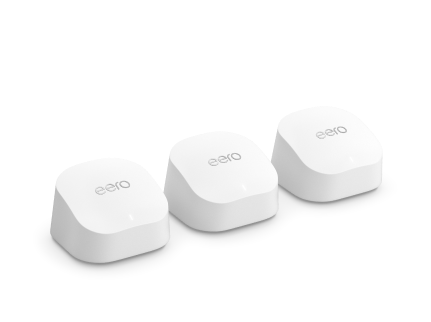
Apartment Wi-Fi has a specific kind of misery. Your neighbour’s network bleeds through every wall, the router the ISP gave you dies in the bedroom, and video calls freeze the moment someone starts streaming in the next room. A mesh Wi-Fi system fixes this by putting a second (or third) node where the signal actually needs to be — but apartments punish the wrong mesh choice: oversized three-packs waste money, subscription-locked features sting every month, and a system built for a five-bedroom house is overkill for 900 square feet.
In this guide we compare the mesh Wi-Fi systems that make sense for apartments in 2026: the Amazon eero 6+, the TP-Link Deco X55, and the Google Nest Wifi Pro. We compare them on published specs and current pricing, based on the manufacturers’ own pages and independent round-ups. We have not tested these systems hands-on. Prices were last checked on 18 Nov 2026 and vary by retailer.
Contents
- Our Quick Picks
- Mesh Wi-Fi for Apartments Compared
- Amazon eero 6+
- TP-Link Deco X55
- Google Nest Wifi Pro
- How to Choose Mesh Wi-Fi for an Apartment
- Final Verdict
- Frequently Asked Questions
Our Quick Picks
- Best overall for apartments: Amazon eero 6+ — the simplest setup, the smallest nodes, and a 2-pack that covers up to 3,000 sq ft.
- Best value with Ethernet ports: TP-Link Deco X55 — three Gigabit ports per node, AX3000 Wi-Fi 6, and no subscription for the basics.
- Best for Google and smart home households: Google Nest Wifi Pro — Wi-Fi 6E, a built-in Thread border router, and Matter support.
Mesh Wi-Fi for Apartments Compared
| Feature | Amazon eero 6+ | TP-Link Deco X55 | Google Nest Wifi Pro |
|---|---|---|---|
| Price (2-pack) | $239.99 list; $159.99 on sale Nov 2026 | Price varies by retailer; 3-pack often $150–$230 | $199.99 per router; 2-pack about $300 |
| Wi-Fi standard | Wi-Fi 6, dual-band | Wi-Fi 6, dual-band, AX3000 | Wi-Fi 6E, tri-band, AXE5400 |
| Coverage (2-pack) | Up to 3,000 sq ft | Up to 4,500 sq ft | Up to 4,400 sq ft |
| Devices | 75+ per system | 150+ per system | Up to 100 per router |
| Ethernet per node | 2x Gigabit | 3x Gigabit | 2x 1 Gbps |
| Internet plans | Up to 1 Gbps | Up to 1 Gbps | Up to 1 Gbps wired |
| Smart home | Zigbee hub built in | Alexa, Google | Matter + Thread border router |
| Subscription | eero Plus $9.99/month optional | HomeShield basics free; Pro paid | No subscription |
| App | eero app (no web interface) | Deco app (no web interface) | Google Home app |
Last checked: 18 Nov 2026. Prices vary by retailer; check the manufacturer’s store before buying.
Amazon eero 6+

The eero 6+ is the mesh system we recommend first for apartments, because it is the one most people will actually finish setting up. It is a dual-band Wi-Fi 6 system that supports internet plans up to a gigabit, covers up to 1,500 sq ft per node (3,000 sq ft for the 2-pack), and connects 75+ devices. Setup is a QR code scan in the eero app, and the whole thing is usually running in under ten minutes. The nodes are small, white and unobtrusive — they disappear on a bookshelf in a way a spiky gaming router never will, which matters when you rent and cannot hide networking gear in a closet.
The 2-pack lists at $239.99, and was on sale for $159.99 in November 2026 — at that price it is the best value mesh kit for a one- or two-bedroom flat. Each node has two Gigabit Ethernet ports, and the system includes a built-in Zigbee smart home hub, so it can control compatible smart lights and sensors directly. The catch is the subscription: advanced security, ad blocking, parental controls and internet backup sit behind eero Plus at $9.99 a month or $99.99 a year. The basics — Wi-Fi, guest network, basic parental controls — are free, and most apartment dwellers will never miss the paid tier. There is also no web interface at all, which power users will dislike, and you need an Amazon account. See it on eero’s official store.
What We Love
- Simplest setup in this guide — running in minutes
- Small, discreet nodes that suit rented flats
- 2-pack covers up to 3,000 sq ft — more than most apartments need
- Built-in Zigbee smart home hub
Considerations
- Advanced security and parental controls need eero Plus ($9.99/month)
- No web interface — app only
- Dual-band only, so node-to-node traffic shares the 5 GHz band with your devices
TP-Link Deco X55
The TP-Link Deco X55 is the value pick with the best hardware for the money. It is a dual-band Wi-Fi 6 system rated AX3000 — up to 2,402 Mbps on the 5 GHz band and 574 Mbps on 2.4 GHz — and TP-Link rates the 3-pack at up to 6,500 sq ft with 150+ connected devices. For an apartment, the 2-pack (up to 4,500 sq ft) is already more than enough, and the 3-pack is only worth it for large or awkwardly shaped flats.
Where the X55 pulls ahead of the eero is ports: three Gigabit Ethernet ports per node, versus two on the eero and Nest Wifi Pro. In an apartment that means the TV, the console and the work laptop can all be wired from a single node, and the system supports Ethernet backhaul if you have wired points. Setup runs through the Deco app in about fifteen minutes, and TP-Link’s HomeShield security and basic parental controls are free — only the advanced Pro features need a paid subscription. Prices move around a lot: the 3-pack is commonly listed between $150 and $230 depending on the sale, so check the live price and do not pay full price. See the specs on TP-Link’s official Deco X55 page.
What We Love
- Three Gigabit Ethernet ports per node — the best in this guide
- AX3000 Wi-Fi 6 with 150+ device capacity
- HomeShield basics and parental controls free; no forced subscription
- Ethernet backhaul supported
Considerations
- Dual-band only — no dedicated backhaul or 6 GHz band
- No web interface — app only
- Price swings widely between sales; check before buying
Google Nest Wifi Pro
The Google Nest Wifi Pro is the premium pick, and the only Wi-Fi 6E system here. It is a tri-band router rated AXE5400 — combined speeds up to 5.4 Gbps across the 2.4, 5 and 6 GHz bands — with one router covering up to 2,200 sq ft, a 2-pack up to 4,400 sq ft, and up to 100 connected devices per router. A single router costs $199.99 on the Google Store, which makes a 2-pack the expensive option here — but for a one-bedroom flat, a single Nest Wifi Pro is often all you need, and that changes the maths completely.
The real reason to buy it is the smart home: Nest Wifi Pro has a built-in Thread border router and Matter support, so it connects Thread devices directly to your network with no extra hub. It is managed entirely in the Google Home app, which is excellent if your home already runs on Google, and there is no subscription at all. The catches are the Ethernet ports — just two 1 Gbps ports per router, so wired speed tops out at a gigabit — and compatibility: Nest Wifi Pro cannot mesh with older Google Wifi or Nest Wifi units, so you cannot extend an existing Google system with it. It is also the most expensive way to cover a large flat. See it on the Google Store.
What We Love
- Wi-Fi 6E tri-band with a 6 GHz band — the least congested spectrum in an apartment block
- Built-in Thread border router and Matter support — no extra hub
- No subscription for any feature
- One router covers up to 2,200 sq ft — enough for many flats on its own
Considerations
- Most expensive option here, especially as a 2-pack
- Only two 1 Gbps Ethernet ports per router
- Cannot mesh with older Google Wifi or Nest Wifi
How to Choose Mesh Wi-Fi for an Apartment
Buy for your floor plan, not the box. A one-bedroom flat under 1,000 sq ft usually needs one good router or a 2-pack at most. A two-bedroom flat with thick concrete walls needs two nodes, placed with one wall between them at most. A three-pack is for large flats, maisonettes, or homes with a garden office — in a standard apartment it is money spent on a node you will never place properly.
Count your neighbours’ networks. In an apartment block, dozens of networks fight over the 2.4 and 5 GHz bands. That is where the Nest Wifi Pro’s 6 GHz band earns its price — it is far less congested. If you buy a dual-band system, use the app’s channel optimisation and put the nodes where they can see each other through as few walls as possible.
Check the subscription before you buy. eero Plus is $9.99 a month, Deco HomeShield Pro is paid, and Nest Wifi Pro charges nothing. Over two years, a “cheap” mesh kit with a subscription can cost more than the expensive one. Decide which features you actually need — most apartment dwellers never use the paid tiers.
Think about wires. If you have a TV, a console and a work PC, the Deco X55’s three ports per node are a genuine advantage. If everything you own is wireless, the eero’s two ports are fine. And if you are choosing between mesh and a single router, our guide to the best mesh Wi-Fi systems for large homes covers the bigger end of the range, while Wi-Fi 7 explained covers whether the newest standard is worth paying for yet.
Final Verdict
For most apartments in 2026, the Amazon eero 6+ is the mesh Wi-Fi to buy: the 2-pack covers up to 3,000 sq ft, setup takes minutes, and at $159.99 on sale it is the best value here. If you have wired devices and want the most ports per dollar, the TP-Link Deco X55 is the better pick, with three Gigabit ports per node and free basic security. And if your flat is drowning in neighbouring networks, or your smart home runs on Google and Thread, the Google Nest Wifi Pro is worth the premium — start with a single $199.99 router and add a second node only if you need it.
Watch: Best Mesh Wi-Fi 7 Routers 2026
For a visual comparison of the mesh systems that matter in 2026, including Deco and eero models, watch this video:
Frequently Asked Questions
Do I need mesh Wi-Fi in an apartment?
Often, yes — if your bedroom or home office is two or more walls from the router, a single router will struggle. A 2-pack mesh system puts a node halfway to the dead zone and fixes it. If your flat is small and open-plan, a single good router may be enough — try moving the router first.
How many mesh nodes do I need for an apartment?
One node per 1,500 to 2,200 sq ft is the manufacturers’ claim, but walls matter more than floor area. Most one-bedroom flats need one router or a 2-pack; most two-bedroom flats need a 2-pack; a 3-pack is rarely needed in an apartment.
Is Wi-Fi 6E worth it in an apartment?
Yes, if you live in a dense block. The 6 GHz band is far less congested than 2.4 and 5 GHz, which your neighbours all share. You need Wi-Fi 6E devices to use it, though — older phones and laptops will still use the 5 GHz band.
Do mesh systems need a subscription?
Not for Wi-Fi itself. eero Plus ($9.99/month) adds advanced security, ad blocking and parental controls; TP-Link charges for HomeShield Pro’s advanced features; Google Nest Wifi Pro has no subscription at all. The basic features — Wi-Fi, guest network, basic parental controls — are free on all three.
All prices and specifications are based on published specs from the manufacturers’ own stores and independent round-ups. Last checked: 18 Nov 2026.