- Home
- Electronics
- Computer Components
- Best Mini PCs 2026: Apple Mac ...


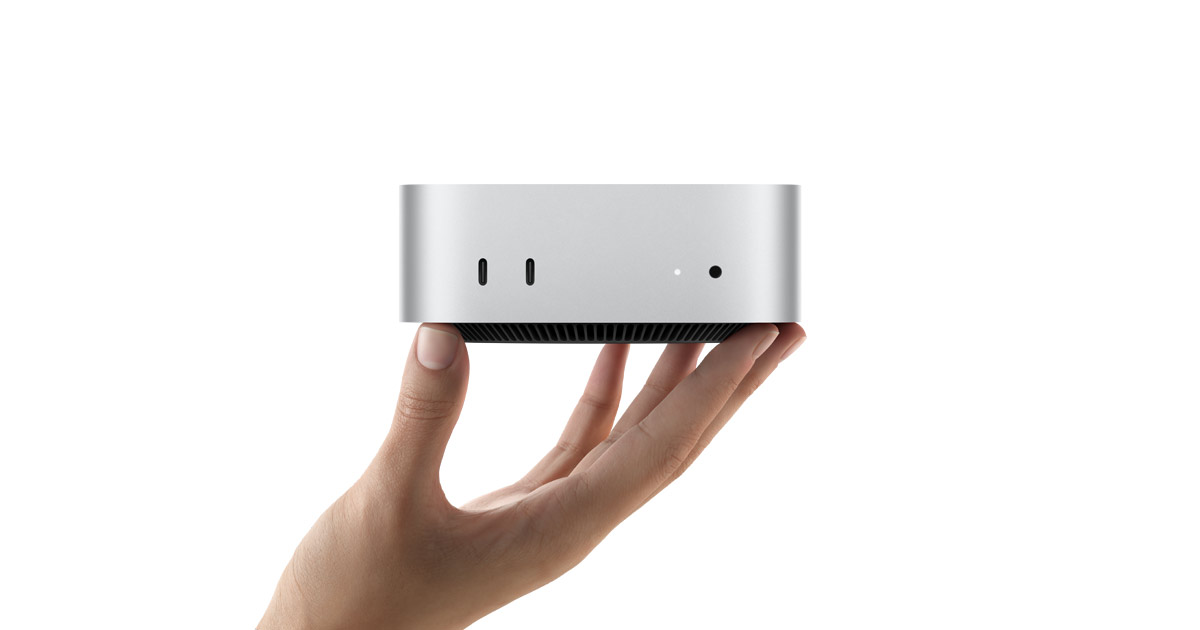
A good mini PC gives you a full desktop computer in a box smaller than a paperback book. No tower humming under the desk, just a quiet little square that drives your monitors and runs your apps. In 2026 the category has matured fast: Apple’s tiny Mac mini, AMD’s powerful Ryzen AI chips and a wave of well-built Windows boxes from Beelink, Minisforum and Geekom mean there is a genuinely good mini PC for almost every desk.
In this guide we compare the best mini PCs of 2026 based on published specs — processors, memory, storage, ports and upgrade options — so you can pick the right one for work, creativity or light gaming. We have not hands-on tested these machines; every claim below comes from the manufacturer’s published specifications or independent reviews. Prices move quickly, so treat every price as a snapshot. Last checked: 18 Nov 2026.
Contents
- Best Mini PCs 2026 at a Glance
- How to Choose a Mini PC
- Apple Mac mini (M4) — Best for Apple Users
- Beelink SER9 — Best Windows Performance
- Minisforum UM890 Pro — Best Value and Upgrades
- Geekom A9 Max — Best for AI and Heavy Multitasking
- GMKtec K8 Plus — Best Budget Mini PC
- Final Verdict
- Frequently Asked Questions
Best Mini PCs 2026 at a Glance
| Mini PC | Processor | Memory / Storage | Best for | Price |
|---|---|---|---|---|
| Apple Mac mini (M4) | Apple M4, 10-core CPU | 16GB unified / 256GB SSD | Apple users, creators | From $599 at launch |
| Beelink SER9 | Ryzen AI 9 HX 370, 12-core | 32GB LPDDR5X / 1TB SSD | Windows performance | About $999–$1,149 |
| Minisforum UM890 Pro | Ryzen 9 8945HS, 8-core | Up to 96GB DDR5 / up to 8TB | Value and upgrades | From $439.90 barebones |
| Geekom A9 Max | Ryzen AI 9 HX 370, 12-core | 32GB DDR5 / 2TB SSD | AI work, multitasking | About $999 |
| GMKtec K8 Plus | Ryzen 7 8845HS, 8-core | 32GB / 1TB SSD | Budget buyers | About $410 |
Prices are US list or street prices seen in late 2026; the exact price depends on the configuration and the retailer. Last checked: 18 Nov 2026.
How to Choose a Mini PC
The single most important decision is the operating system. If your work lives in macOS — Final Cut Pro, Logic Pro, the iPhone ecosystem — the Mac mini is the only mini PC that runs it. Everyone else should buy Windows: the AMD-powered boxes below ship with Windows 11 Pro and run the full range of PC software and games.
Next, think about upgrades. Apple’s memory and storage are fixed at the time you order: what you buy is what you keep. Most Windows mini PCs let you add memory and storage later through standard SO-DIMM and M.2 slots — the Minisforum UM890 Pro, for example, supports up to 96GB of DDR5 memory and up to 8TB of storage across two M.2 slots, according to Minisforum’s published specifications.
Ports matter more than they look on a spec sheet. Count your monitors first: a good mini PC should drive at least two displays, and the best ones drive three or four. Look for USB4 or Thunderbolt for a fast dock, dual 2.5GbE Ethernet if you run a home server or NAS, and Wi-Fi 6E or Wi-Fi 7 for wireless speed.
1. Apple Mac mini (M4) — Best for Apple Users

The Mac mini with the M4 chip is the smallest desktop Apple has ever made: 12.7 x 12.7 x 5 cm and just 0.67 kg, according to Apple’s published specifications. Inside is the 10-core M4 chip with a 10-core GPU and a 16-core Neural Engine, with 16GB of unified memory and a 256GB SSD in the base configuration. It has three Thunderbolt 4 ports, HDMI 2.1 and Gigabit Ethernet, with 10GbE as a build-to-order option.
For creators already in the Apple world it is hard to beat: silent running, tiny footprint and macOS with Final Cut Pro, Logic Pro and the whole iPhone ecosystem. The catch never goes away: memory and storage cannot be upgraded later, so buy the configuration you will need in three years, not the one you need today.
Price: Apple launched the M4 Mac mini at $599 (16GB/256GB). During 2026 Apple reshuffled the lineup and the entry configuration moved to $799 with 512GB of storage, so check the live configurator before buying. See the official page at apple.com/mac-mini. Last checked: 18 Nov 2026.
What we love: tiny, silent, excellent performance per watt, superb for creative apps on macOS.
Considerations: memory and storage are sealed; only two display outputs on the base model without a dock; macOS only.
2. Beelink SER9 — Best Windows Performance
The Beelink SER9 packs AMD’s Ryzen AI 9 HX 370 — 12 cores and 24 threads boosting to 5.1GHz, with Radeon 890M integrated graphics — into a 0.6-litre metal box. It ships with 32GB of LPDDR5X memory and a 1TB PCIe 4.0 SSD, and it has two M.2 slots for up to 8TB of total storage, USB4, HDMI 2.1, DisplayPort 1.4 and 2.5GbE Ethernet, driving up to three 4K displays at once. Windows 11 Pro comes pre-installed.
The Radeon 890M is the strongest integrated graphics in this size class, which makes the SER9 the best mini PC here for light gaming at 1080p and for creative apps that lean on the GPU.
Price: around $999 at launch for the 32GB/1TB HX 370 configuration; Beelink’s own store has listed the same build at $1,149, and street prices move with memory costs, so the price varies by retailer. Last checked: 18 Nov 2026.
What we love: strongest integrated graphics in its class, premium metal chassis, triple 4K display support, quiet running.
Considerations: memory is soldered and cannot be upgraded; Wi-Fi 6 only, no Wi-Fi 6E or 7; street price has climbed during 2026.
3. Minisforum UM890 Pro — Best Value and Upgrades
The Minisforum UM890 Pro is our pick for most Windows buyers. It uses the Ryzen 9 8945HS — 8 cores and 16 threads boosting to 5.2GHz, with Radeon 780M graphics — and unlike the Beelink it lets you upgrade almost everything: up to 96GB of DDR5-5600 memory across two SO-DIMM slots and up to 8TB of storage across two M.2 PCIe 4.0 slots, according to Minisforum’s published specifications. It also has dual USB4 ports, HDMI, DisplayPort, dual 2.5GbE Ethernet, Wi-Fi 6E and an OCuLink port for connecting an external graphics card later.
That upgrade path is the whole point. Buy it with 32GB today, add memory and a second SSD in a year, and add an external GPU through OCuLink if you ever want to play demanding games.
Price: from $439.90 barebones on Minisforum’s own store, or about $650–$824 with 32GB of memory and a 1TB SSD, depending on the configuration. See the official page at minisforum.com. Last checked: 18 Nov 2026.
What we love: user-upgradeable memory and storage, OCuLink for an external GPU, quad-display support, strong price-to-performance ratio.
Considerations: no Thunderbolt, Wi-Fi 6E rather than Wi-Fi 7, less well-known brand than Apple or Asus.
4. Geekom A9 Max — Best for AI and Heavy Multitasking
The Geekom A9 Max pairs the same Ryzen AI 9 HX 370 chip as the Beelink SER9 with a crucial difference: its memory is upgradeable, up to 128GB of DDR5 across two SO-DIMM slots, with dual M.2 slots for up to 8TB of storage. The 50 TOPS NPU in the HX 370 chip makes it a strong choice for on-device AI work and local language models, and the Radeon 890M graphics handle casual gaming at 1080p. It also idles at very low power, which makes it a good always-on home server or home-lab box too.
Price: about $999 for the 32GB/2TB configuration; the price varies by retailer. See the official page at geekompc.com. Last checked: 18 Nov 2026.
What we love: upgradeable memory up to 128GB, strong NPU for local AI, dual 2.5GbE, low idle power.
Considerations: expensive for a mini PC, fan noise rises under sustained load, premium over the UM890 Pro buys mostly the newer chip.
5. GMKtec K8 Plus — Best Budget Mini PC
If your budget is tight, the GMKtec K8 Plus delivers most of the Windows experience for roughly half the price of the premium picks. It uses the Ryzen 7 8845HS (8 cores, 16 threads) with Radeon 780M graphics, 32GB of memory and a 1TB SSD, plus OCuLink and dual 2.5GbE Ethernet. It handles office work, browsing and streaming easily.
Price: about $410 for the 32GB/1TB configuration, based on US prices seen in October 2026; the price varies by retailer. Last checked: 18 Nov 2026.
What we love: excellent value, same Ryzen 7 chip class as boxes costing twice as much, OCuLink included, upgradeable memory and storage.
Considerations: plastic-heavy build compared with the metal Beelink and Geekom, shorter warranty than some rivals, fan is audible under load.
Watch: Best Mini PCs Under $500 in 2026
For a visual walkthrough of the budget end of the market, this video compares four mini PCs under $500 and explains which one suits gaming, a quiet desk and plain office work:
Final Verdict
For most people buying a Windows mini PC in 2026, the Minisforum UM890 Pro is the sweet spot: a fast Ryzen 9 chip, memory and storage you can upgrade yourself, quad-display support and an OCuLink port for a future external GPU, all for hundreds less than the premium picks. If you want the strongest integrated graphics and a premium metal chassis, the Beelink SER9 is the step up. Apple users should buy the Mac mini (M4) — just order it with more memory than you think you need, because you can never add more later. And if money is tight, the GMKtec K8 Plus gives you a genuinely capable desktop for about $410.
Whichever you choose, match the machine to your operating system first, your upgrade plans second and your monitor count third. If you are building a full desk setup, our guides to crafting your perfect PC and choosing a high-end graphics card will help you plan the rest of the system.
Frequently Asked Questions
Is a mini PC as powerful as a desktop tower?
For everyday work, office apps, browsing and media, yes — modern mini PCs use the same laptop-class processors found in premium notebooks, and the fastest ones rival mid-range desktops. For heavy gaming or 3D rendering a tower with a discrete graphics card still wins, although some mini PCs can connect an external GPU through OCuLink or USB4.
Can I upgrade the RAM and storage in a mini PC?
It depends on the model. Most Windows mini PCs, including the Minisforum UM890 Pro, Geekom A9 Max and GMKtec K8 Plus, use standard SO-DIMM memory slots and M.2 SSD slots you can upgrade yourself. The Apple Mac mini and the Beelink SER9 have soldered memory that cannot be changed after purchase, so choose your configuration carefully.
How many monitors can a mini PC drive?
Most current mini PCs drive at least two displays, and the best ones drive three or four: the Beelink SER9 and Minisforum UM890 Pro both support up to four displays through combinations of HDMI, DisplayPort and USB4.
Do mini PCs get hot and noisy?
They run warmer than a big tower because everything is packed into a small chassis, but the models in this guide are designed for quiet desk use. Based on published specs and independent reviews, the Beelink SER9 and Geekom A9 Max are among the quietest, while budget boxes tend to spin their fans up sooner under load.
Is the Mac mini M4 still worth buying in 2026?
For Apple users, yes — it remains the cheapest way into a fast Apple desktop, and the M4 chip handles creative work comfortably. Just be aware that Apple reshuffled the lineup during 2026, so the entry price has moved up from the original $599 launch price; check the live Apple configurator before buying. Last checked: 18 Nov 2026.