- Home
- Electronics
- Laptops and Tablets
- Best Business Laptops 2026: Th ...


A business laptop has a different job from a gaming laptop or a student laptop. It needs to survive a commute, last a full working day, type well for hours, and still be worth using in three years — and it needs to do all of that without drama. The best business laptops of 2026 pair a great keyboard and a bright screen with proper security, a good webcam, and a warranty you can actually use. This guide compares the best business laptops of 2026, based on published specs from the manufacturers, so you can match a machine to your work, not just to a spec sheet.
Prices below are typical US list or starting prices for the base configuration. Business laptops are sold in dozens of configurations, so treat the figures as a snapshot — last checked: 19 Nov 2026.
Contents
- Best business laptops at a glance
- Lenovo ThinkPad X1 Carbon Gen 13 — best overall
- Dell Pro 14 — best for IT departments
- HP EliteBook 640 G11 — best value
- Apple MacBook Air M4 — best for Apple workplaces
- Lenovo ThinkPad E14 Gen 7 — best budget
- What to check before you buy
- Final verdict
- Frequently asked questions
Best business laptops at a glance
| Laptop | Display | Processor | Weight | Price* |
|---|---|---|---|---|
| ThinkPad X1 Carbon Gen 13 | 14-inch, up to 2.8K OLED 120Hz | Intel Core Ultra 7 | From 986g | From around $2,050 |
| Dell Pro 14 | 14-inch | Intel Core Ultra 5 | From 1.32kg | From $1,649 |
| HP EliteBook 640 G11 | 14-inch | Intel Core Ultra | From 1.36kg | $1,229.99 |
| MacBook Air M4 | 13.6-inch Liquid Retina | Apple M4 | 1.24kg | From $999 |
| ThinkPad E14 Gen 7 | 14-inch | AMD Ryzen / Intel Core Ultra | From 1.4kg | From $964 |
*Prices are typical US starting or list prices, last checked: 19 Nov 2026. Business laptops are heavily discounted through corporate channels, so check your employer’s pricing before paying list.
Lenovo ThinkPad X1 Carbon Gen 13 — best business laptop overall

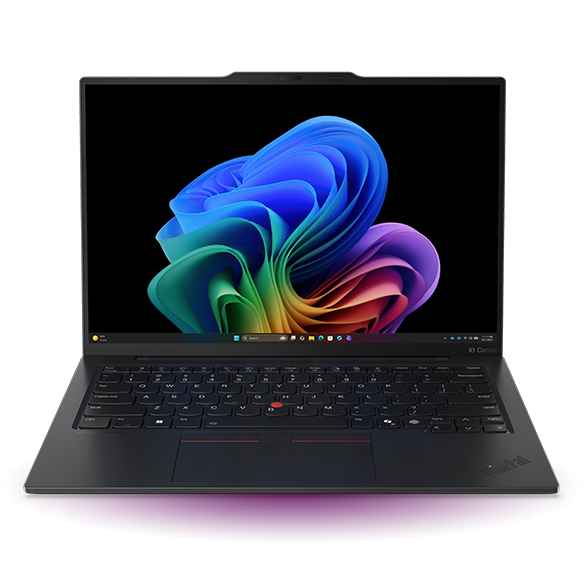
The ThinkPad X1 Carbon Gen 13 is the flagship business ultraportable, and it shows in every detail. It starts at around $2,050 at major retailers, and for that you get a 14-inch laptop that weighs from 986 grams, an Intel Core Ultra 7 processor with AI-ready Copilot+ PC features, up to 32GB of memory and a 1TB SSD, and the option of a 2.8K 120Hz OLED display. The keyboard is the best in this guide — deep, quiet travel with the red TrackPoint for mouse-free navigation — and the machine is built to the MIL-STD-810H durability standard, so it is designed to survive drops, vibration and temperature swings.
Battery life is a full working day in normal office use, and the 14-inch screen is bright enough for a window seat. The price is the honest catch: this is a premium machine, and the OLED display and top configurations push well past $2,500. But if you travel constantly and your laptop is your office, the X1 Carbon is the lightest, best-built Windows business laptop you can buy.
What we love: from 986g, best keyboard in this guide, 2.8K OLED option, Copilot+ AI features, MIL-STD durability. Considerations: from around $2,050, top configurations are much more expensive, RAM is soldered so buy enough at purchase.
Dell Pro 14 — best business laptop for IT departments
The Dell Pro 14 is the successor to the Latitude line, and it is the laptop most IT departments will standardise on: a 14-inch business machine with Intel Core Ultra processors, vPro options for remote management, and Dell’s ProSupport service behind it. Build-your-own configurations start at $1,649 on Dell.com, with sale configurations from $1,129, which makes it cheaper than the X1 Carbon for a similar 14-inch screen and a similar day of office work.
What the Dell Pro 14 offers over cheaper consumer laptops is manageability and service: vPro for remote fixes, a spill-resistant keyboard, and a three-year support option that means a broken machine is fixed quickly rather than replaced slowly. It is heavier than the X1 Carbon, starting at around 1.32 kg, and the base screen is a standard 1080p panel rather than an OLED — fine for spreadsheets and video calls, less exciting for creative work. If you are buying for a team rather than for yourself, this is the sensible default.
What we love: from $1,649 (sale configs from $1,129), vPro remote management, strong support options, spill-resistant keyboard. Considerations: heavier than the X1 Carbon, base screen is standard 1080p, some configurations show as sold out on Dell.com.
HP EliteBook 640 G11 — best value business laptop
The HP EliteBook 640 G11 is the value pick of this guide: a 14-inch business laptop with an Intel Core Ultra processor, Windows 11 Pro and HP’s Wolf Security for business, listed at $1,229.99. It is the cheapest way into a proper business laptop from one of the big three makers, and it covers the essentials well — a good keyboard, a 1080p webcam with a privacy shutter, a solid aluminium chassis and a full set of ports including USB-C, USB-A and HDMI.
You give up the X1 Carbon’s weight and screen: the EliteBook starts at around 1.36 kg and the base display is a standard 1080p panel. Battery life is a working day rather than a working day and a half. But for desk-based work with occasional travel, the EliteBook 640 G11 does everything a business laptop needs to do for roughly $800 less than the ThinkPad flagship, and that is a hard deal to argue with.
What we love: $1,229.99, Windows 11 Pro, webcam privacy shutter, full port selection, HP Wolf Security. Considerations: heavier than the X1 Carbon, standard 1080p screen, shorter battery life than the MacBook Air.
Apple MacBook Air M4 — best business laptop for Apple workplaces
The MacBook Air M4 is the best business laptop for anyone whose work already runs on Apple: from $999, with a 13.6-inch Liquid Retina display, the Apple M4 chip, 16GB of unified memory as standard, and up to 18 hours of video playback on a charge according to Apple’s own rating. It is fanless, so it is completely silent, and at 1.24 kg it is lighter than every Windows machine in this guide except the X1 Carbon.
The M4 chip handles office work, video calls and even light photo and video editing without breaking a sweat, and macOS brings strong built-in security and device management for IT teams. The catches are familiar Apple ones: ports are limited to two Thunderbolt ports and MagSafe charging, so a dock is needed for a multi-monitor desk, and some business software is Windows-only. If your workplace is already on Apple, or your work is mostly browser, email and documents, the MacBook Air M4 is the best value laptop in this guide.
What we love: from $999, up to 18 hours of video playback, silent fanless design, 16GB memory standard, 1.24kg. Considerations: only two Thunderbolt ports, some business software is Windows-only, no touchscreen option.
Lenovo ThinkPad E14 Gen 7 — best budget business laptop
The ThinkPad E14 Gen 7 is the cheapest way into a real ThinkPad: from $964 for the AMD version, and from $1,139 for Intel versions on Lenovo’s own store. You still get the ThinkPad keyboard, the TrackPoint, a 14-inch screen and a proper business build — just in a slightly heavier chassis (from 1.4 kg) and without the X1 Carbon’s premium materials and OLED screen option.
For a small business buying five or ten laptops, the E14 is the smart money: the same keyboard and reliability reputation as the flagship, at less than half the price. The trade-offs are weight, a standard 1080p display, and a shorter warranty by default — worth upgrading to three years if the machines will be used hard. If your budget is under $1,000 per machine, this is the business laptop to buy.
What we love: from $964, real ThinkPad keyboard and TrackPoint, solid business build, great fleet value. Considerations: heavier than the X1 Carbon, standard screen, shorter default warranty.
What to check before you buy
First, decide your operating system: Windows is the default for most businesses, macOS suits Apple workplaces, and some specialist software is Windows-only — check before you switch. Second, buy 16GB of memory as a minimum in 2026, and 32GB if you run large spreadsheets, virtual machines or creative apps; on most of these machines the memory is soldered and cannot be upgraded later. Third, weigh the laptop: the difference between 986 grams and 1.4 kg is the difference between a bag you forget and a bag you feel. Fourth, check the warranty — a three-year onsite warranty is worth paying for on a machine your work depends on. Finally, check the webcam and microphone: a 1080p webcam and a privacy shutter are now standard on business laptops, and they matter more than they used to in a world of daily video calls.
If you are kitting out the rest of your work setup, our best budget laptops under $600 guide covers cheaper options, our best laptops for computer science and software engineering guide covers performance machines, and our best portable monitors guide covers second screens for travel. Manufacturer pages: Dell Pro 14 and Apple MacBook Air M4.
Final verdict
For most professionals, the Lenovo ThinkPad X1 Carbon Gen 13 is the best business laptop of 2026: the lightest machine here, the best keyboard, and a screen and build quality to match. If you are buying for a team, the Dell Pro 14 is the sensible standard, and the HP EliteBook 640 G11 at $1,229.99 is the best value. Apple workplaces should buy the MacBook Air M4 from $999, and anyone with a sub-$1,000 budget should buy the ThinkPad E14 Gen 7. Whichever you choose, buy 16GB of memory minimum and a three-year warranty — both are cheaper now than they are later.
Frequently asked questions
How much should a business laptop cost?
A good business laptop costs from around $964 to $2,050 in 2026, depending on the machine. The ThinkPad E14 Gen 7 starts at $964, the HP EliteBook 640 G11 lists at $1,229.99, and the ThinkPad X1 Carbon Gen 13 starts at around $2,050. Business laptops are often cheaper through corporate channels, so check your employer’s pricing first.
Is 16GB of memory enough for a business laptop?
Yes, 16GB is the sensible minimum in 2026 for office work, video calls and browsing. Choose 32GB if you run large spreadsheets, virtual machines, or photo and video editing. On most business laptops the memory is soldered, so buy what you need at purchase — you cannot upgrade it later.
Do I need a touchscreen on a business laptop?
Probably not. A touchscreen adds cost and weight, and most business software is designed for a keyboard and mouse. It is worth having if you present to clients, annotate documents, or use your laptop as a tablet — otherwise, spend the money on a better screen or more memory.
What is MIL-STD-810H, and does it matter?
MIL-STD-810H is a US military durability standard that manufacturers test against for drops, vibration, humidity and temperature extremes. It is a useful sign that a laptop is built to survive travel, but it is a test standard, not a guarantee — a good warranty matters more than a badge.
MacBook Air or ThinkPad for business?
Choose the MacBook Air M4 if your workplace already uses Apple, your work is browser, email and documents, and you value battery life and silence. Choose a ThinkPad if you need Windows-only software, want the best laptop keyboard, or need vPro remote management and a three-year onsite warranty.