- Home
- Electronics
- Computer Components
- Best Mechanical Keyboards for ...


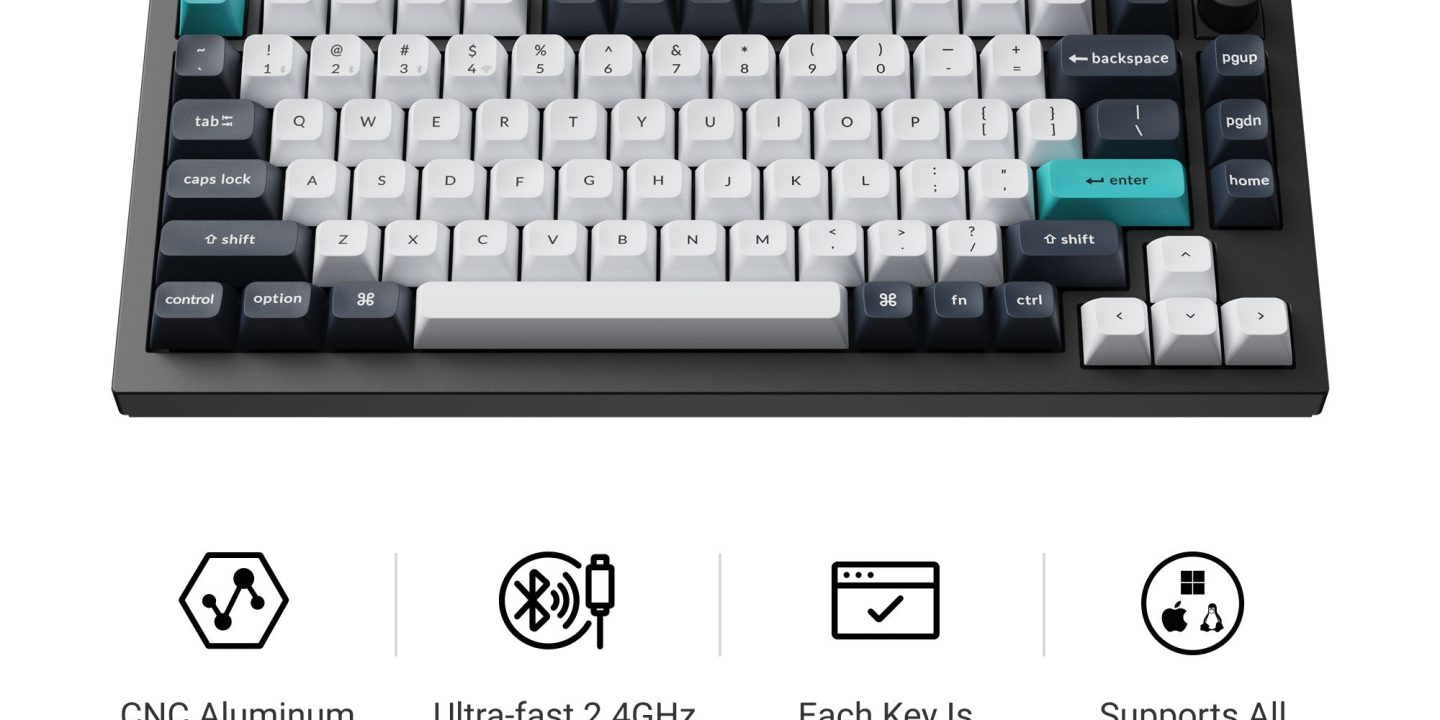
If you type all day, your keyboard is the tool you touch more than any other — and a good mechanical keyboard makes the difference between tired fingers at 5pm and a day that just flows. The best mechanical keyboards for typing in 2026 are not the flashy gaming boards with the fastest switches: they are the boards with a comfortable layout, switches that suit long writing sessions, and a solid, quiet feel. This guide compares the best mechanical keyboards for typing in 2026, based on published specs from the manufacturers, so you can match a board to the way you actually type.
Prices below are typical US list prices. Prices move constantly, so treat the figures as a snapshot — last checked: 19 Nov 2026.
Contents
- Best mechanical keyboards for typing at a glance
- Keychron Q1 Max — best overall
- Keychron K2 Max — best value wireless
- Keychron V1 Max — best budget
- Logitech MX Keys S — best non-mechanical alternative
- Keychron K3 Max — best low-profile
- What to check before you buy
- Final verdict
- Frequently asked questions
Best mechanical keyboards for typing at a glance
| Keyboard | Layout | Switches | Connection | Price* |
|---|---|---|---|---|
| Keychron Q1 Max | 75%, knob | Hot-swap mechanical | 2.4 GHz, Bluetooth, wired | $229.99 |
| Keychron K2 Max | 75% | Hot-swap mechanical | 2.4 GHz, Bluetooth, wired | $124.99 |
| Keychron V1 Max | 75% | Hot-swap mechanical | 2.4 GHz, Bluetooth, wired | $114.99 |
| Logitech MX Keys S | Full size | Scissor (not mechanical) | Bluetooth, Logi Bolt | $109.99 |
| Keychron K3 Max | 75%, low-profile | Hot-swap low-profile | 2.4 GHz, Bluetooth, wired | $109.99 |
*Prices are typical US list prices for the fully assembled versions, last checked: 19 Nov 2026. Barebone versions without switches and keycaps cost less.
Keychron Q1 Max — best mechanical keyboard for typing overall

The Keychron Q1 Max is the best typing keyboard in this guide, and it earns that title the moment you put it on your desk. The fully assembled knob version costs $229.99, and for that you get a CNC-machined aluminium body that weighs 1,724 grams — heavy enough that it never slides around while you type — a double-gasket mount that softens each keystroke, hot-swappable switches, and a rotary knob for volume. It is a 75% layout, which keeps the function row, arrow keys and navigation cluster while dropping the number pad, bringing your mouse closer to your body.
It runs QMK firmware, set up through Keychron’s Launcher web app, so you can remap keys and record macros — handy if you type the same shortcut chains fifty times a day. Battery life is rated at up to 180 hours with the backlight off, and it connects over 2.4 GHz wireless, Bluetooth or USB-C wired. Keychron recommends the Gateron Jupiter Brown switches for typing: a gentle tactile bump without the noise of clicky switches. The only real downside is the weight — at 1.7 kg this is a desk keyboard, not a travel one.
What we love: full aluminium body, gasket mount, hot-swap switches, QMK macros, 180-hour battery, knob included. Considerations: $229.99 is a premium price, 1,724 g is too heavy to carry daily, no number pad.
Keychron K2 Max — best value wireless mechanical keyboard
The Keychron K2 Max is the sweet spot of this guide: a 75% wireless mechanical keyboard for $124.99 that keeps almost everything that makes the Q1 Max good, in a lighter plastic body with an aluminium frame option. It is tri-mode — 2.4 GHz, Bluetooth 5.1 and wired — with a 4,000 mAh battery rated for up to 190 hours, and the Max model runs QMK, so macros and remapping work just like on the Q1 Max. It ships with keycaps for both macOS and Windows, which matters if you switch between a MacBook and a PC.
At 940 grams in plastic (1,080 grams with the aluminium frame) it is much easier to move between desks than the Q1 Max, and it is the board Keychron itself recommends most often for Mac users who want a mechanical feel. You give up the full-metal body and the gasket mount, so the typing feel is a touch firmer and less cushioned — but for half the price, that is a fair trade. If you want one mechanical keyboard for typing and do not want to spend over $200, buy this one.
What we love: $124.99, tri-mode wireless, QMK support, up to 190-hour battery, Mac and Windows keycaps included. Considerations: firmer feel than the gasket-mounted Q1 Max, no knob, plastic body flexes slightly under hard typing.
Keychron V1 Max — best budget mechanical keyboard for typing
The Keychron V1 Max is the budget way into a proper hot-swappable mechanical keyboard: $114.99 at list price, and frequently on sale for $104.99. It is a 75% board with the same tri-mode wireless and QMK support as its more expensive siblings, so you are not giving up connectivity or programmability — you are giving up the aluminium case and some of the acoustic refinement. For a first mechanical keyboard, or a second board for a home office, that is the right trade.
Like the K2 Max it is hot-swappable, so you can change switches later without soldering — start with tactile browns for typing, and swap to linear reds later if you prefer a smoother press. If your budget is firm at around $100, the V1 Max is the best typing keyboard you can buy new; the only reason to spend more is the feel of a metal case.
What we love: $114.99 ($104.99 on sale), hot-swap switches, tri-mode wireless, QMK support. Considerations: plastic case, less refined acoustics than the Q series, no knob.
Logitech MX Keys S — best non-mechanical keyboard for typing
Not everyone wants a mechanical keyboard, and the Logitech MX Keys S is the best reason why. At $109.99 it is a full-size, low-profile board with quiet scissor switches, backlit keys that light up as your hands approach, and multi-device switching across three computers. The key feel is precise and laptop-like, with a slight dish to each keycap that guides your fingers — many fast typists prefer it to a mechanical board for all-day writing.
Battery life is rated at up to 10 days with the backlight on, or up to 5 months with it off, and it charges over USB-C. It connects over Bluetooth or Logitech’s Bolt receiver. The honest caveat is that the switches are not hot-swappable and not mechanical, so you cannot change the feel later, and it will never have the deep, cushioned thock of a gasket-mounted board. But if you want a quiet, refined, full-size keyboard with a number pad, this is the one.
What we love: $109.99, quiet scissor switches, full size with number pad, smart backlighting, multi-device. Considerations: not mechanical, switches cannot be swapped, no QMK-style macro support.
Keychron K3 Max — best low-profile mechanical keyboard
The Keychron K3 Max is for typists coming from a laptop keyboard who find full-height mechanical boards too tall. At $109.99 it is a low-profile 75% board with hot-swappable low-profile switches, QMK support, and the same tri-mode wireless as the rest of the Keychron Max range. The shorter key travel feels familiar if you type on a MacBook all day, and the slim case is easier to carry in a bag than the Q1 Max.
Battery life is rated at up to 73 hours with the backlight off, which Keychron marks as a lab figure — shorter than the full-height boards, because the slim case holds a smaller battery. And low-profile boards only take low-profile switches, so your switch choices are narrower. But if wrist comfort or portability matters more to you than maximum battery life, the K3 Max is the low-profile pick.
What we love: $109.99, low-profile and portable, hot-swap low-profile switches, QMK support. Considerations: shorter battery life, fewer switch options than full-height boards, no number pad.
What to check before you buy
First, pick your switch type: tactile browns are the safe default for typing, with a gentle bump you can feel; linear reds are smoother and quieter; clicky blues are satisfying but loud enough to annoy colleagues. Second, pick your layout: 75% keeps the function row and arrows and suits most desks; full size only matters if you type numbers all day, in which case a board with a number pad is worth the extra desk space. Third, decide whether you need wireless — 2.4 GHz is best for a fixed desk, Bluetooth is best for switching between a laptop and a tablet. Fourth, check the weight: a heavy aluminium board stays put and feels premium, but it is not a travel keyboard. Finally, remember that hot-swap matters: it lets you change switches later without buying a new keyboard, which is the cheapest upgrade in this hobby.
If you are building the rest of the desk, our best wireless gaming keyboards guide covers low-latency boards, our mechanical keyboard switch explainer covers optical, Hall effect and magnetic switches in depth, and our best ultrawide monitors for productivity covers the screen side of the setup. Manufacturer pages: Keychron Q1 Max, Keychron K2 Max and Logitech MX Keys S.
Final verdict
For most typists, the Keychron Q1 Max at $229.99 is the best mechanical keyboard for typing in 2026: a full aluminium body, gasket mount, hot-swap switches and QMK macros in a compact 75% layout. If that is more than you want to spend, the Keychron K2 Max at $124.99 keeps the wireless, the QMK support and the Mac keycaps for half the price. Budget buyers should take the V1 Max, laptop typists should try the low-profile K3 Max, and anyone who wants a quiet full-size board with a number pad should buy the Logitech MX Keys S instead. Whichever you choose, start with tactile brown switches — they are the safest first switch for long typing sessions.
Frequently asked questions
What is the best switch type for typing?
Tactile switches, such as browns, are the best default for typing: you feel a small bump as the key registers, which helps accuracy without the noise of clicky switches. Linear switches are smoother and quieter, and clicky switches are satisfying but loud enough to bother people nearby.
What does hot-swappable mean?
Hot-swappable means you can pull switches out and push new ones in without soldering. It lets you change the feel of your keyboard later — for example, swapping tactile switches for linear ones — without buying a whole new board.
Is a 75% keyboard good for typing?
Yes. A 75% layout keeps the function row, arrow keys and navigation cluster, which are the keys typists actually use, and drops only the number pad. That brings your mouse closer to your body, which is more comfortable for long sessions. Only buy full size if you type numbers all day.
Do mechanical keyboards work with Mac?
Yes. Keychron boards ship with keycaps for both macOS and Windows and a system toggle switch, and the Logitech MX Keys S comes in a Mac version too. Check that the board you buy includes Mac keycaps in the box before ordering.
Are mechanical keyboards loud?
They can be, but they do not have to be. Tactile and linear switches with a gasket-mounted board are only slightly louder than a laptop keyboard, and many boards accept foam or quieter switches. Clicky switches are the loud ones — avoid them in a shared office.