- Home
- Electronics
- Computer Components
- Best Ultrawide Monitors for Pr ...


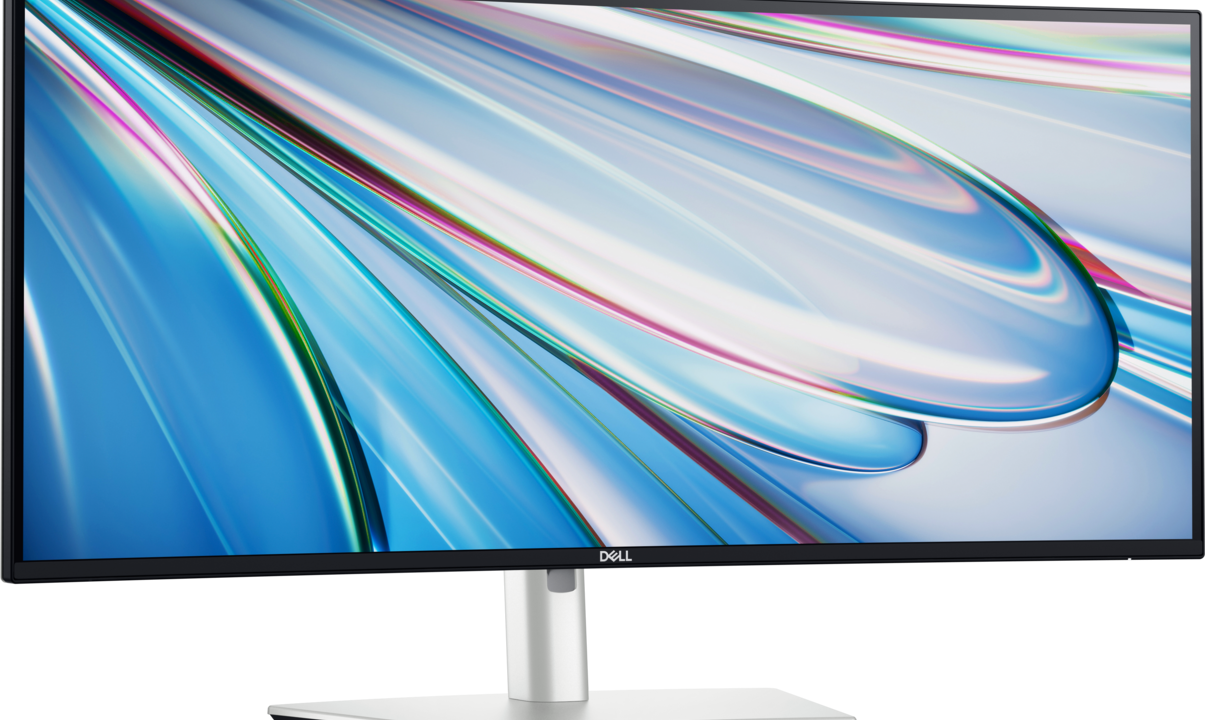
An ultrawide monitor replaces two screens with one seamless panel — no bezel down the middle, no mismatched colours, no second power cable. For productivity that means a spreadsheet and a document side by side, a code editor with room for the terminal, or a video timeline that finally fits on screen. In 2026 the best ultrawide monitors for productivity pair a sharp 34-inch or 40-inch panel with a proper docking hub, so one cable charges your laptop and connects everything on your desk.
In this guide we compare the best ultrawide monitors for productivity in 2026 based on published specs — panel type, resolution, refresh rate, colour coverage, USB-C power delivery and KVM features. We have not hands-on tested these monitors; every claim below comes from the manufacturer’s published specifications or independent reviews. Prices move with sales, so treat every price as a snapshot. Last checked: 18 Nov 2026.
Contents
- Best Ultrawide Monitors for Productivity at a Glance
- How to Choose an Ultrawide Monitor for Work
- Dell UltraSharp U3425WE — Best Overall
- Dell UltraSharp U4025QW — Best Big Screen
- Dell 34 Plus S3425DW — Best Value
- Samsung ViewFinity S65UC — Best Flat Panel
- LG 34WR55QC — Best Budget Ultrawide
- Final Verdict
- Frequently Asked Questions
Best Ultrawide Monitors for Productivity at a Glance
| Monitor | Size / Resolution | Panel / Refresh | USB-C power | Price |
|---|---|---|---|---|
| Dell UltraSharp U3425WE | 34.1″ / 3440 x 1440 | IPS Black / 120Hz | Thunderbolt 4, 90W | About $780–$1,000 |
| Dell UltraSharp U4025QW | 40″ / 5120 x 2160 | IPS Black / 120Hz | Thunderbolt, 140W | Price varies |
| Dell 34 Plus S3425DW | 34″ / 3440 x 1440 | VA / 100Hz | USB-C | About $330 |
| Samsung ViewFinity S65UC | 34″ / 3440 x 1440 | VA / 100Hz | USB-C, 90W | About $310 |
| LG 34WR55QC | 34″ / 3440 x 1440 | VA / 100Hz | USB-C | About $200–$300 |
Prices are US list or street prices seen in late 2026; the exact price depends on the retailer and the sale cycle. Last checked: 18 Nov 2026.
How to Choose an Ultrawide Monitor for Work
Start with resolution, not size. A 34-inch ultrawide at 3440 x 1440 gives you the same vertical space as a 1440p monitor with roughly a third more width — enough for two full windows side by side. A 40-inch 5K2K panel (5120 x 2160) adds real vertical room too, which is what long spreadsheets and code files need. If your work is mostly tall documents, a 4K 16:9 screen may suit you better than any ultrawide.
Next, look at the panel. IPS Black, used in the Dell UltraSharp models, delivers a 2000:1 contrast ratio — roughly double a standard IPS panel — so blacks look deeper and text looks crisper. VA panels are cheaper and have good contrast, but viewing angles and colour accuracy are weaker, which matters if you edit photos or video. For colour-critical work, look for 98% DCI-P3 coverage and factory calibration to Delta E under 2, both of which the U3425WE offers, according to Dell’s published specifications.
Then check the dock. The number printed next to the USB-C port decides whether your laptop actually charges: a laptop that needs 90W will charge slowly or not at all from a 65W port. Thunderbolt 4 adds daisy-chaining and more bandwidth, and a built-in KVM switch lets one keyboard and mouse control two computers. Finally, measure your desk: a 34-inch ultrawide needs at least 75 cm of depth for comfortable viewing, and 40-inch and larger panels need more.
1. Dell UltraSharp U3425WE — Best Overall

The Dell UltraSharp U3425WE is the ultrawide most productivity roundups rank first in 2026, and the spec sheet explains why. Its 34.1-inch curved IPS Black panel runs at 3440 x 1440 and 120Hz, with a 2000:1 contrast ratio, 98% DCI-P3 colour coverage, factory calibration to Delta E under 2 and 300 nits of brightness, according to Dell’s published specifications. The Thunderbolt 4 hub delivers up to 90W of power to a laptop, and the monitor adds a built-in KVM switch, 2.5GbE Ethernet, built-in speakers and a stand with 150 mm of height adjustment.
It also splits its screen into two 1720 x 1440 halves with no software required, so it genuinely replaces a dual-monitor desk. The trade-offs are the 300-nit brightness, which is ordinary rather than eye-catching, and the price — it is the most expensive 34-inch pick here.
Price: list price $999.99, with street prices often around $780–$830 and some retailers higher; the price varies by retailer. See the official Dell listing for the UltraSharp U3425WE. Last checked: 18 Nov 2026.
What we love: IPS Black contrast, Thunderbolt 4 dock with 90W charging, built-in KVM, 120Hz smoothness, factory colour calibration.
Considerations: 300-nit brightness is modest, 1440 rows show fewer spreadsheet lines than 4K, premium price, heavy at nearly 24 lbs.
2. Dell UltraSharp U4025QW — Best Big Screen
If 34 inches is not enough, the Dell UltraSharp U4025QW is the largest sharp single-screen workspace in this guide: a 40-inch curved IPS Black panel at 5120 x 2160 (5K2K) and 120Hz, with a single-cable Thunderbolt dock delivering up to 140W of power. That resolution gives you the width of an ultrawide and the vertical room of a 4K screen at the same time, so long documents, timelines and code files all fit without scrolling.
It is a big, heavy, expensive monitor that needs a deep desk and a sturdy arm or stand, and it is overkill if your work is mostly email and documents. For video editors, developers and traders who live in wide timelines and dense grids, it is the closest thing to a wall of monitors without the bezels.
Price: the price varies by retailer and is significantly above the 34-inch models; check the live Dell listing for the UltraSharp U4025QW. Last checked: 18 Nov 2026.
What we love: huge 5K2K workspace, IPS Black panel, 140W Thunderbolt charging, replaces two or three screens.
Considerations: expensive, needs a deep desk, heavy, overkill for light office work.
3. Dell 34 Plus S3425DW — Best Value
The Dell 34 Plus S3425DW delivers the 34-inch ultrawide essentials for far less than the UltraSharp: a 3440 x 1440 VA panel at 100Hz with USB-C connectivity, in a curved 21:9 screen that fits two windows side by side. Independent roundups call it the most recommended value monitor for 2026, and it is easy to see why — you get the ultrawide workspace and the one-cable laptop connection without paying for Thunderbolt, KVM or factory calibration.
The VA panel means narrower viewing angles and less accurate colour than the IPS Black models, and there is no Thunderbolt dock, so it suits general office work, coding and writing far better than colour-critical photo or video editing.
Price: about $330 at street prices seen in late 2026; the price varies by retailer. Last checked: 18 Nov 2026.
What we love: genuine 34-inch ultrawide for about a third of the UltraSharp’s price, 100Hz smoothness, USB-C single-cable connection.
Considerations: VA panel with weaker viewing angles, no Thunderbolt, no KVM, not ideal for colour-critical work.
4. Samsung ViewFinity S65UC — Best Flat Panel
Not everyone wants a curved screen. The Samsung ViewFinity S65UC is a flat 34-inch ultrawide at 3440 x 1440 and 100Hz, with USB-C connectivity and an auto-brightness sensor that adjusts the panel to the room. A flat panel keeps straight lines straight, which matters for design work, spreadsheets and anyone who finds curves distracting at the edges of the screen.
It is a VA panel, so colour accuracy and viewing angles trail the IPS Black Dells, but for general productivity, coding and office work it is a strong, sensibly priced alternative to the curved options.
Price: about $310 at street prices seen in late 2026; the price varies by retailer. Last checked: 18 Nov 2026.
What we love: flat panel for straight lines, 100Hz refresh, USB-C connection, auto-brightness sensor.
Considerations: VA panel, no Thunderbolt, modest brightness, fewer docking features than the Dell UltraSharp.
5. LG 34WR55QC — Best Budget Ultrawide
The LG 34WR55QC is the cheapest way into a 34-inch ultrawide: a curved 3440 x 1440 VA panel at 100Hz with USB-C, often found for around $200–$300. It covers the basics — wide workspace, smooth scrolling, single-cable laptop connection — and it is the pick if you want to try the ultrawide format without committing UltraSharp money.
Expect compromises at this price: a basic stand, no Thunderbolt, no KVM and a VA panel with average colour accuracy. For writing, browsing, spreadsheets and video calls it is more than enough, and it is a big step up from a single 27-inch screen.
Price: about $200–$300 depending on the retailer and the sale cycle; the price varies by retailer. See LG’s monitor range at lg.com. Last checked: 18 Nov 2026.
What we love: lowest price in this guide, genuine 34-inch 21:9 workspace, 100Hz panel, USB-C.
Considerations: basic stand and features, VA panel, no Thunderbolt or KVM, not for colour-critical work.
Final Verdict
For most productivity desks, the Dell UltraSharp U3425WE is the best ultrawide monitor: an IPS Black panel with real contrast, a Thunderbolt 4 dock that charges your laptop at 90W, a built-in KVM and 120Hz smoothness, all in a 34-inch screen that replaces two monitors. If you need the biggest possible workspace, step up to the Dell UltraSharp U4025QW and its 40-inch 5K2K panel. On a budget, the Dell 34 Plus S3425DW gives you the ultrawide essentials for about $330, the Samsung ViewFinity S65UC is the flat-panel alternative, and the LG 34WR55QC is the cheapest way in.
Before you order, measure your desk depth — 75 cm minimum for a 34-inch ultrawide — and check your laptop’s power needs against the monitor’s USB-C wattage. Get those two right and one ultrawide will tidy your whole desk. To complete the setup, see our guides to high-refresh gaming monitors and choosing a MacBook for work.
Frequently Asked Questions
Is an ultrawide monitor better than two monitors?
For deep work with one or two main apps, yes — an ultrawide has no bezel in the middle and window tools like Windows 11 snap layouts and PowerToys FancyZones split it into tidy columns. For heavy multitasking with five or more apps visible at once, two separate monitors still win, because each screen is its own snap target and the bezel acts as a natural divider.
What resolution should a productivity ultrawide have?
3440 x 1440 is the sweet spot for 34-inch ultrawides: sharp text, two full windows side by side and no scaling headaches. A 40-inch panel should be 5120 x 2160 (5K2K) to stay sharp. Avoid 2560 x 1080 ultrawides — text looks soft at 34 inches and you lose the vertical room that makes an ultrawide useful.
Do I need Thunderbolt on an ultrawide monitor?
Only if you want a one-cable desk with a laptop. Thunderbolt 4 carries video, data and up to 90W or 140W of charging over a single cable, and it supports daisy-chaining a second display. If your computer is a desktop, plain DisplayPort or HDMI is fine and a cheaper monitor without Thunderbolt will serve you just as well.
Is a curved ultrawide good for productivity?
Yes for most people: the gentle curve keeps the edges of a wide screen at a more even viewing distance, which reduces eye strain over long sessions. If you do precise design work where straight lines matter, a flat panel like the Samsung ViewFinity S65UC is the safer choice.
How much desk depth do I need for an ultrawide?
At least 75 cm of depth for a 34-inch ultrawide, and 85 cm or more for a 40-inch or 45-inch panel. Sit too close and you will crane your neck to read the edges; a monitor arm can buy back a few centimetres by pushing the screen to the back of the desk.