- Home
- Electronics
- Networking and Connectivity
- Best Mesh Wi-Fi for Gaming 202 ...


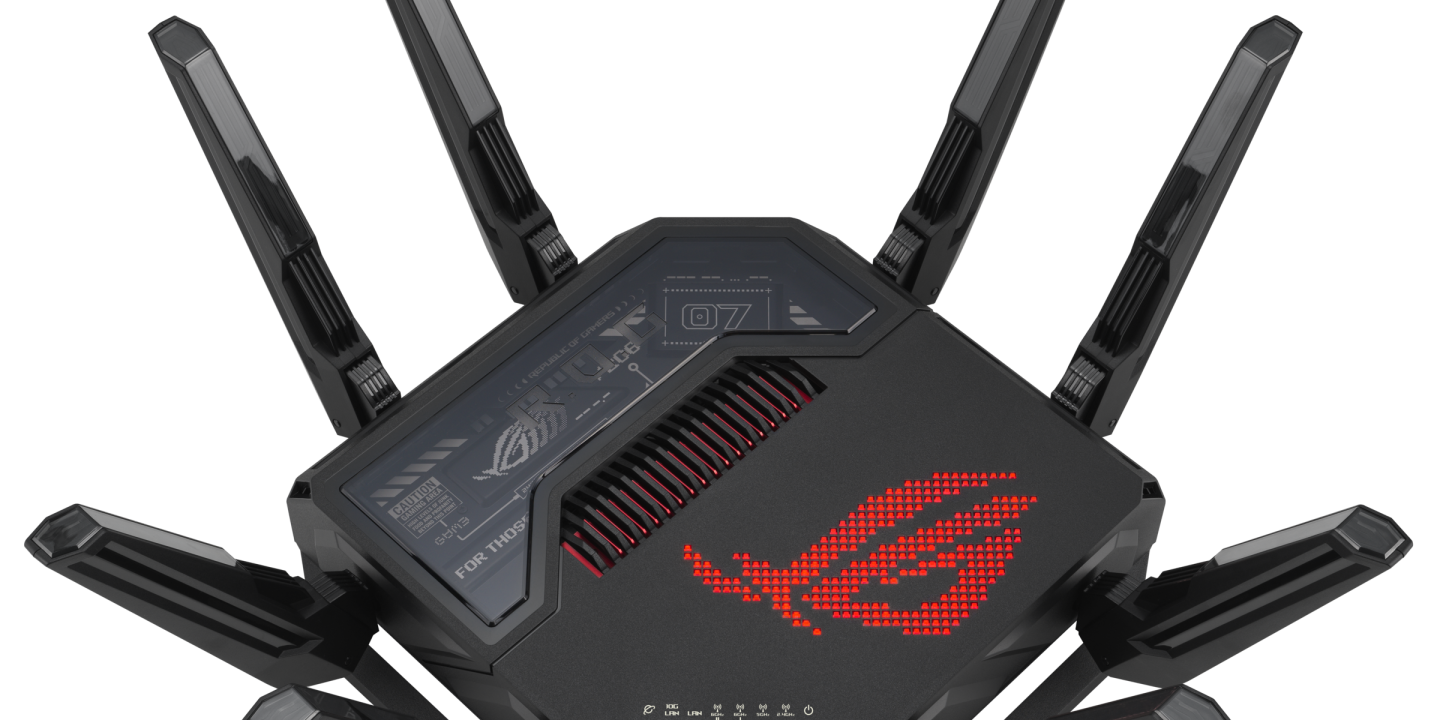
Gaming over Wi-Fi has a reputation problem, and most of it is deserved. A single router in the hallway, a console two rooms away, and a household full of phones, TVs and laptops fighting for the same airwaves is a recipe for lag spikes at the worst possible moment. A mesh Wi-Fi system built for gaming fixes the two things that actually matter: coverage that reaches the room you play in, and a backhaul that does not steal bandwidth from your game to talk to itself.
In this guide we compare the best mesh Wi-Fi systems for gaming in 2026 on published specs and current pricing from the manufacturers’ own pages and independent round-ups. We have not tested these systems hands-on. Prices were last checked on 19 Nov 2026 and vary by retailer.
One honest caveat first: for competitive play, a wired Ethernet connection to your PC or console still beats any Wi-Fi, mesh or not. What a gaming mesh does is make wireless play as good as it can be. If you can run a cable to your gaming setup, do that first, and let the mesh handle everything else.
Contents
- Our Quick Picks
- Gaming Mesh Wi-Fi Compared
- ASUS ROG Rapture GT-BE98 Pro
- ASUS ROG Rapture GT6
- TP-Link Deco XE75
- NETGEAR Orbi 770
- TP-Link Deco BE63
- Watch: GT-BE98 Pro & GT6 Review
- How to Choose Gaming Mesh Wi-Fi
- Final Verdict
- Frequently Asked Questions
Our Quick Picks
- Best overall for gaming: ASUS ROG Rapture GT-BE98 Pro — quad-band Wi-Fi 7, dual 10G ports, $684.99.
- Best mesh gaming value: ASUS ROG Rapture GT6 — tri-band Wi-Fi 6 mesh with a dedicated backhaul and a 2.5G port.
- Best budget mesh: TP-Link Deco XE75 — tri-band Wi-Fi 6E 2-pack, $199.99.
- Best whole-home: NETGEAR Orbi 770 — Wi-Fi 7 mesh with up to 8,000 sq ft of coverage, $569.
- Best Wi-Fi 7 value: TP-Link Deco BE63 — tri-band Wi-Fi 7, $249.99.
Gaming Mesh Wi-Fi Compared
| Feature | ROG GT-BE98 Pro | ROG GT6 | Deco XE75 | Orbi 770 | Deco BE63 |
|---|---|---|---|---|---|
| Price | $684.99 | Check current price | $199.99 (2-pack) | $569 | $249.99 |
| Wi-Fi standard | Wi-Fi 7, quad-band | Wi-Fi 6, tri-band | Wi-Fi 6E, tri-band | Wi-Fi 7, tri-band | Wi-Fi 7, tri-band |
| Speed class | Up to 30 Gbps | Up to 10,000 Mbps | AXE5400 | BE11000 | BE10000 |
| Coverage | Up to 3,000 sq ft (expandable via AiMesh) | Up to 5,800 sq ft (2-pack) | Up to 5,500 sq ft (2-pack) | Up to 8,000 sq ft | Expandable mesh |
| Wired ports | Dual 10G + quad 2.5G | 2.5G port | Gigabit | 2.5G WAN + Gigabit LAN | 2.5G per unit |
| Gaming features | Triple-level game acceleration | Triple-level game acceleration | QoS prioritisation | QoS prioritisation | QoS prioritisation |
Last checked: 19 Nov 2026. Prices are live retailer listings and change often. The GT6 price varies by retailer and bundle, so check the current price before buying.
ASUS ROG Rapture GT-BE98 Pro — Best Overall for Gaming
The ROG Rapture GT-BE98 Pro is the most serious gaming router you can buy in 2026, and the one this guide is built around. It is a quad-band Wi-Fi 7 router with a stated speed class of up to 30 Gbps, using 320MHz channels in the 6GHz band, 4096-QAM and Multi-Link Operation, which connects across bands simultaneously for more stable, lower-latency transfers. The fourth band can be dedicated to gaming traffic, so your game is not competing with the rest of the house.
The wired side is just as serious: dual 10G ports and four 2.5G ports, so a gaming PC, a console and a NAS can all run at multi-gigabit speeds. It supports AiMesh, so you can add ASUS nodes later and turn it into a full mesh system. At $684.99 it is expensive, and it is overkill for a flat with one gamer — but for a large home where gaming is the priority, nothing else here matches it.
Pros: Quad-band Wi-Fi 7 with a dedicated gaming band; dual 10G and quad 2.5G ports; AiMesh expandable; triple-level game acceleration.
Cons: $684.99 is a lot for a single router; huge and power-hungry; overkill unless gaming is the priority.
ASUS ROG Rapture GT6 — Best Mesh Gaming Value

The ROG Rapture GT6 is the mesh-native gaming pick. It is a tri-band Wi-Fi 6 mesh system with a dedicated backhaul band, a stated speed class of up to 10,000 Mbps, coverage of up to 5,800 sq ft for the two-pack, and a 2.5G port for a wired gaming setup. Because the backhaul has its own band, the nodes talk to each other without eating into the bandwidth your game uses — which is the single most important thing in a gaming mesh.
It carries the same ROG game acceleration features as the GT-BE98 Pro, and it pairs naturally with it: buy the GT-BE98 Pro as the main router and add GT6 nodes, or run the GT6 on its own as a complete gaming mesh. Wi-Fi 6 rather than Wi-Fi 7 is the compromise, but for gaming — where latency matters far more than headline speed — it is a sensible one. Check the current price before buying, as it varies by retailer and bundle.
Pros: True mesh with a dedicated backhaul; 2.5G port; up to 5,800 sq ft coverage; ROG game acceleration included.
Cons: Wi-Fi 6, not Wi-Fi 7; price varies by retailer; fewer wired ports than the GT-BE98 Pro.
TP-Link Deco XE75 — Best Budget Mesh
The TP-Link Deco XE75 is the cheapest way into a proper tri-band gaming mesh. At $199.99 for a two-pack, you get Wi-Fi 6E with a 6GHz band, an AXE5400 speed class, and coverage of up to 5,500 sq ft. The third band acts as backhaul, so the nodes stay fast even when the house is busy, and the Deco app makes setup genuinely simple — about ten minutes from box to working network.
The compromise is ports: Gigabit only, with no 2.5G option, so wired multi-gigabit is off the table. But for wireless gaming on a console or a laptop, the XE75 is fast, stable and a fraction of the price of the ROG systems. If your budget is under $250 and you need whole-home coverage, this is the pick. It is also worth comparing with the standard mesh picks in our guide to the best mesh Wi-Fi for apartments.
Pros: Tri-band Wi-Fi 6E for $199.99; dedicated 6GHz backhaul; simple app setup; good coverage for the price.
Cons: Gigabit ports only — no 2.5G; no ROG-style game acceleration; QoS is basic.
NETGEAR Orbi 770 — Best Whole-Home
The NETGEAR Orbi 770 is the pick for a large home where gaming is one priority among many. It is a tri-band Wi-Fi 7 mesh system with a BE11000 speed class, coverage listed at up to 8,000 sq ft, and a 2.5G WAN port, for $569. Orbi’s dedicated backhaul has always been its strength: the nodes communicate on their own band, so your game does not slow down when someone starts streaming in 4K in the next room.
Orbi is less gamer-focused than ASUS — there is no triple-level game acceleration, just solid QoS prioritisation — but the coverage and the consistency are excellent, and the system is close to set-and-forget.
Pros: Huge coverage, up to 8,000 sq ft; Wi-Fi 7 with dedicated backhaul; 2.5G WAN port; very easy to live with.
Cons: $569 is a lot for a non-gaming-focused system; no 10G ports; advanced features are limited.
TP-Link Deco BE63 — Best Wi-Fi 7 Value
The TP-Link Deco BE63 brings Wi-Fi 7 into the mainstream price range. At $249.99 it is a tri-band Wi-Fi 7 mesh unit with a BE10000 speed class and 2.5G ports on each unit, and it expands into a full mesh by adding more nodes. For a gamer buying in 2026, it is the cheapest way to get Wi-Fi 7, Multi-Link Operation and modern backhaul in a system that will stay current for years.
It lacks the ROG acceleration and the sheer port count of the GT-BE98 Pro, and a single unit will not cover a large house on its own. But as the start of a Wi-Fi 7 mesh it is the best value in this guide.
Pros: Wi-Fi 7 for $249.99; 2.5G ports; BE10000 speed class; easy to expand with more nodes.
Cons: Single unit, not a pack; no dedicated gaming features; needs a second node for large homes.
Watch: GT-BE98 Pro & GT6 Review
This review covers the ASUS ROG Rapture GT-BE98 Pro paired with the GT6 mesh system — the combination at the top of this guide — including the 30 Gbps speed class, the dedicated backhaul and the 5,800 sq ft coverage.
How to Choose Gaming Mesh Wi-Fi
Backhaul is everything. In a mesh system, the nodes have to talk to each other as well as to your devices. Dual-band mesh systems share one band for both jobs, which halves your speed at the far node. Tri-band and quad-band systems give the backhaul its own band — look for “dedicated backhaul” on the spec sheet, and treat it as a requirement for gaming.
Wire what you can. A wired backhaul — Ethernet between nodes — is faster and more stable than any wireless backhaul, and a wired connection from your PC or console to the nearest node beats Wi-Fi every time. If your house has Ethernet ports, use them; our guide to the best Wi-Fi 7 routers under $200 and the best mesh Wi-Fi systems for large homes cover the wider options.
Check the ports. A 2.5G port matters if your internet plan is faster than gigabit, and it matters for a wired gaming PC or a NAS. The GT-BE98 Pro’s 10G ports are for enthusiasts; the Deco XE75’s Gigabit ports are fine for most homes.
QoS helps, but it is not magic. Game acceleration and QoS prioritise gaming packets over downloads and streams, which smooths out lag when the house is busy.
Final Verdict
For the best gaming mesh money can buy, the ASUS ROG Rapture GT-BE98 Pro at $684.99 is the pick: quad-band Wi-Fi 7, a dedicated gaming band, dual 10G ports and AiMesh expansion. For a true mesh system at a saner price, the ASUS ROG Rapture GT6 gives you a dedicated backhaul and ROG acceleration in a two-pack covering up to 5,800 sq ft. On a budget, the TP-Link Deco XE75 at $199.99 is the best-value gaming mesh, and the Deco BE63 at $249.99 is the cheapest way into Wi-Fi 7.
Frequently Asked Questions
Is mesh Wi-Fi good for gaming? Yes, if it is tri-band or better with a dedicated backhaul. Dual-band mesh can add latency because the nodes share a band with your devices. For competitive play, a wired Ethernet connection still beats any Wi-Fi.
Is Wi-Fi 7 worth it for gaming? Wi-Fi 7’s Multi-Link Operation and wider channels reduce latency and improve stability, which matters for gaming. But Wi-Fi 6 mesh with a dedicated backhaul is already very good — upgrade to Wi-Fi 7 if you are buying new, not just for the badge.
What is a dedicated backhaul? It is a separate radio band that mesh nodes use to talk to each other, so your devices get the full speed of the other bands. Systems without one share a band between backhaul and devices, which cuts speed at the far nodes.
How many mesh nodes do I need for gaming? Two nodes cover most homes up to about 5,000 sq ft; three cover large or multi-storey homes. Put one node in or near the room you play in, and wire your PC or console to it if you can.
Do gaming routers actually reduce ping? They can reduce latency inside your home network by prioritising game traffic, but they cannot fix a slow internet plan or a distant game server. If your ping is high, check your plan speed and your server region before buying a router.