- Home
- Electronics
- Laptops and Tablets
- Best Tablets for Note-Taking 2 ...


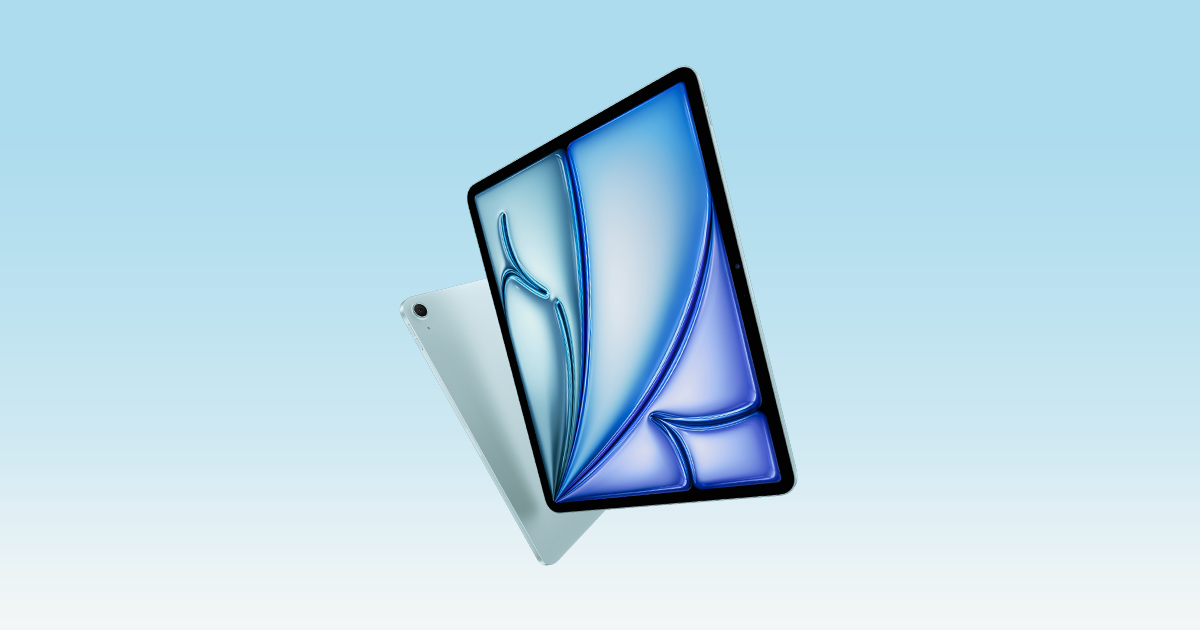
Handwritten notes are back — but the notebook has changed. The best tablets for note-taking in 2026 let you write with a stylus, search your handwriting and mark up PDFs in a device thinner than a paperback. The catch is that “best” depends on what you write: an iPad is a full computer that takes great notes, a Galaxy Tab includes the pen in the box, and a reMarkable is a distraction-free digital notebook that does almost nothing else — brilliantly.
This guide compares the three approaches head to head — iPad, Galaxy Tab and reMarkable — based on published specs from Apple, Samsung and reMarkable. Prices are snapshots from official listings — last checked: 18 Nov 2026.
Contents
- Note-taking tablets at a glance
- Apple iPad Air (M4) — best overall
- Samsung Galaxy Tab S10 FE — best value Android
- reMarkable Paper Pro — best distraction-free writing
- Budget and reading-first alternatives
- The apps matter as much as the pen
- Watch: note-taking tablets compared
- Final verdict
- Frequently asked questions
Note-taking tablets at a glance
| Tablet | Screen | Pen | Battery (claimed) | Starting price* |
|---|---|---|---|---|
| Apple iPad Air 11 in (M4) | 11 in Liquid Retina, 2360 x 1640 | Apple Pencil Pro ($129) or Pencil USB-C ($79), sold separately | Up to 10 hours | $599 + pen |
| Samsung Galaxy Tab S10 FE | 10.9 in LCD, 2304 x 1440, 90 Hz | S Pen included in the box | Up to 20 hours video playback | $499.99 launch; $549.99 current list |
| reMarkable Paper Pro | 11.8 in Canvas Color E Ink, 2160 x 1620 | Marker included in the box | Up to 2 weeks | From $629 |
| reMarkable Paper Pure | 10.3 in black-and-white E Ink | Marker included in the box | Up to 3 weeks | From $399 |
| Amazon Kindle Scribe | 11 in E Ink with front light | Pen included | Weeks of reading use | From $429.99 |
*Prices from official listings, last checked: 18 Nov 2026. Prices vary by storage, connectivity and retailer.
Apple iPad Air (M4) — best overall
The iPad Air with M4 is the best note-taking tablet for most people, because it is the best tablet full stop. The 11-inch Liquid Retina display (2360 x 1640, 264 ppi, 500 nits) is sharp and bright, the M4 chip handles anything a student or professional throws at it, and the note-taking app library is unmatched: GoodNotes, Notability, Apple Notes, Microsoft OneNote and Nebo all run here, with handwriting search and PDF annotation no other platform matches.
The pen is the catch. Neither the Apple Pencil Pro ($129) nor the Apple Pencil (USB-C) ($79) ships in the box, so the real starting price is $599 for the tablet plus the pen — about $728 with the Pencil Pro, or about $678 with the USB-C Pencil. For note-taking alone, the USB-C Pencil is the better buy: it has the pixel-perfect precision, low latency and tilt sensitivity that matter for handwriting, and the Pro’s extras — pressure sensitivity, squeeze, barrel roll, haptic feedback and Find My — matter more for drawing than for notes.
The iPad Air weighs 460 grams, is 6.1 mm thick, and Apple claims up to 10 hours of web or video use. It also does everything else: email, video calls, streaming and research. That versatility is why it wins for most people — and why it loses for people who get distracted by it.
What we love
- The deepest note-taking app library anywhere.
- Sharp laminated 11-inch display, fast M4 chip, 10-hour battery, just 460 g.
- Apple Pencil USB-C ($79) covers everything a note-taker needs; the Pro ($129) adds artist features.
Considerations
- The pen is not included — budget $678–$728 to start writing, not $599.
- A full computer in your bag is also a full set of distractions.
- Glossy screen; a paper-like screen protector helps the writing feel but costs extra.
See the current iPad Air on Apple’s official iPad Air page. For how the iPad Air compares with a full laptop, see our M4 MacBook Air vs MacBook Pro guide.
Samsung Galaxy Tab S10 FE — best value Android
The Samsung Galaxy Tab S10 FE is the best-value note-taking tablet in this guide, and the reason is simple: the S Pen is in the box. You pay for the tablet and you can start writing immediately, with no $79–$129 pen to add. Samsung launched it at $499.99 for the Wi-Fi model, and the current Samsung list price is $549.99 for 128GB — price varies by retailer.
The specs are strong for the money. The 10.9-inch LCD runs at 2304 x 1440 with an adaptive refresh rate up to 90Hz, the Exynos 1580 chip pairs with 8GB of RAM and 128GB of storage (or 12GB and 256GB), and the 8,000mAh battery supports 45W wired charging — Samsung claims up to 20 hours of video playback. The tablet is IP68 rated and Samsung promises seven years of software updates. The included S Pen is pressure-sensitive, though it lacks the Bluetooth features of Samsung’s premium pens.
For notes, Samsung Notes is genuinely good, with handwriting-to-text, PDF annotation and a Math Solver that works out equations you write with the pen. GoodNotes and OneNote are available on Android too, though the note-taking app library is thinner than on iPad. The screen is an LCD rather than the AMOLED panel on Samsung’s flagship tablets, so blacks are greyer — a fair trade at this price, and the 90Hz refresh keeps scrolling and writing smooth.
What we love
- S Pen included in the box — the lowest total cost to start writing among full tablets.
- 90Hz display, IP68 rating and seven years of updates.
- 8,000mAh battery with 45W charging; up to 20 hours of video playback claimed.
Considerations
- LCD screen, not AMOLED — greyer blacks than Samsung’s flagship tablets.
- Thinner note-taking app library than iPad; the S Pen has no Bluetooth features.
- Current list price ($549.99) is higher than the $499.99 launch price.
See the official specs on Samsung’s Galaxy Tab S10 FE page. For the flagship comparison, our iPad Pro vs Galaxy Tab S10 Ultra guide covers the top-end tablets in depth.
reMarkable Paper Pro — best distraction-free writing
The reMarkable Paper Pro is not a tablet that takes notes. It is a notebook that happens to be digital — and for some people, that is exactly the point. There are no social media apps, no games, no web browser and no notifications: just an 11.8-inch Canvas Color E Ink display, a Marker, and a writing feel reviewers call the closest thing to pen on paper.
The published specs explain why. The Canvas Color display renders 20,000 colours at 2160 x 1620 (229 ppi), with an adjustable reading light and a textured surface. Writing latency is 12 milliseconds, the pen-to-ink distance is under a millimetre, and the battery lasts up to two weeks of writing. Storage is 64GB, the Marker is included, and the device weighs 525 grams at 5.1 mm thick. It starts at $629 with the Marker; the Marker Plus bundle is $679.
The trade-offs are the point of the device. It cannot run apps, so there is no GoodNotes, no web research, no video. Handwriting conversion works on the tablet with Wi-Fi and a reMarkable account, and the Connect subscription ($3.99 a month or $39.90 a year) unlocks handwriting search, unlimited cloud sync and app editing. If you want one device that does everything, this is the wrong device. If you want a device that does one thing — writing — with total focus, nothing in this guide comes closer.
What we love
- The best writing feel of any device here — paper texture, 12 ms latency, colour E Ink.
- Up to two weeks of battery life and zero distractions by design.
- Marker included; 64GB of storage holds hundreds of notebooks.
Considerations
- Not a general-purpose tablet: no apps, no browser, no video.
- Handwriting search and unlimited sync need the Connect subscription ($3.99/month).
- At $629 it costs more than the Galaxy Tab S10 FE while doing far less.
See the official details on reMarkable’s Paper Pro page.
Budget and reading-first alternatives
reMarkable Paper Pure — from $399. The budget E-ink option: a 10.3-inch black-and-white Canvas display, 360 grams, 32GB of storage and up to three weeks of battery life, with the Marker included. If colour does not matter to you, the Paper Pure saves $230.
Amazon Kindle Scribe — from $429.99. The reading-first choice: an 11-inch front-lit E Ink e-reader with a pen for notes and annotation.
Samsung Galaxy Tab S6 Lite — price varies by retailer. The budget Android pick: a 10.4-inch tablet with an S Pen included and around 13 hours of battery life, according to published specs. It is the cheapest way to get a proper pen and a full Android tablet in one box.
The apps matter as much as the pen
A stylus is only as good as the software behind it. On iPad, GoodNotes and Notability are the standards: searchable handwriting, audio-synced notes, PDF annotation and cloud sync. Apple Notes is free and better than most people expect, and OneNote suits students already in the Microsoft ecosystem. On Samsung tablets, Samsung Notes covers handwriting-to-text and PDF markup well. On reMarkable, the native notebooks and PDF tools are excellent — but there is no third-party app library at all. Before you choose a tablet, check that the app you actually use runs on it.
Watch: note-taking tablets compared
We could not verify a suitable YouTube video for this guide at the time of writing, so there is no video embed here — the recommendations above are based on published specs from Apple, Samsung and reMarkable, not on hands-on testing.
Final verdict
For most people, the iPad Air (M4) is the best tablet for note-taking in 2026: the best apps and the sharpest screen — just budget $678 with the USB-C Pencil, not $599. If you want the best value, the Galaxy Tab S10 FE wins: the S Pen is in the box and $549.99 buys a complete setup with seven years of updates. If you want to write without distractions, the reMarkable Paper Pro is unmatched at $629 with the Marker included. Pick the iPad for versatility, the Galaxy Tab for value, and the reMarkable for focus.
Frequently Asked Questions
What is the best tablet for note-taking in 2026?
For most people, the 11-inch iPad Air with M4, paired with an Apple Pencil — it has the best note-taking apps (GoodNotes, Notability, Apple Notes) and a sharp laminated display. The Galaxy Tab S10 FE is the best-value alternative because the S Pen is included, and the reMarkable Paper Pro is best for distraction-free writing.
Do I need the Apple Pencil Pro for note-taking?
No. For handwriting and PDF annotation, the Apple Pencil (USB-C) at $79 has everything that matters: pixel-perfect precision, low latency and tilt sensitivity. The Pencil Pro at $129 adds pressure sensitivity, squeeze, barrel roll and Find My — features that matter more for drawing than for notes.
Is the reMarkable Paper Pro worth it over an iPad?
Only if focus is the goal. The Paper Pro’s colour E Ink screen, 12 ms latency and two-week battery give it the best writing feel here, and it has no apps to distract you. But it cannot run GoodNotes or browse the web, and handwriting search needs the $3.99-a-month Connect subscription.
Does the Galaxy Tab S10 FE come with a pen?
Yes. The S Pen is included in the box with the Galaxy Tab S10 FE, so you can start writing immediately with no extra purchase. The pen is pressure-sensitive but has no Bluetooth features.
Can E-ink tablets replace paper notebooks?
For writing and reading, mostly yes: the reMarkable Paper Pro and Paper Pure store hundreds of notebooks, convert handwriting to text and sync to the cloud. But they cannot run apps, so most students still need a laptop or tablet alongside them.
Prices and specs in this guide are based on published specs from Apple, Samsung and reMarkable. Last checked: 18 Nov 2026.
