- Home
- Electronics
- Networking and Connectivity
- NAS vs Cloud Backup: Which Is ...


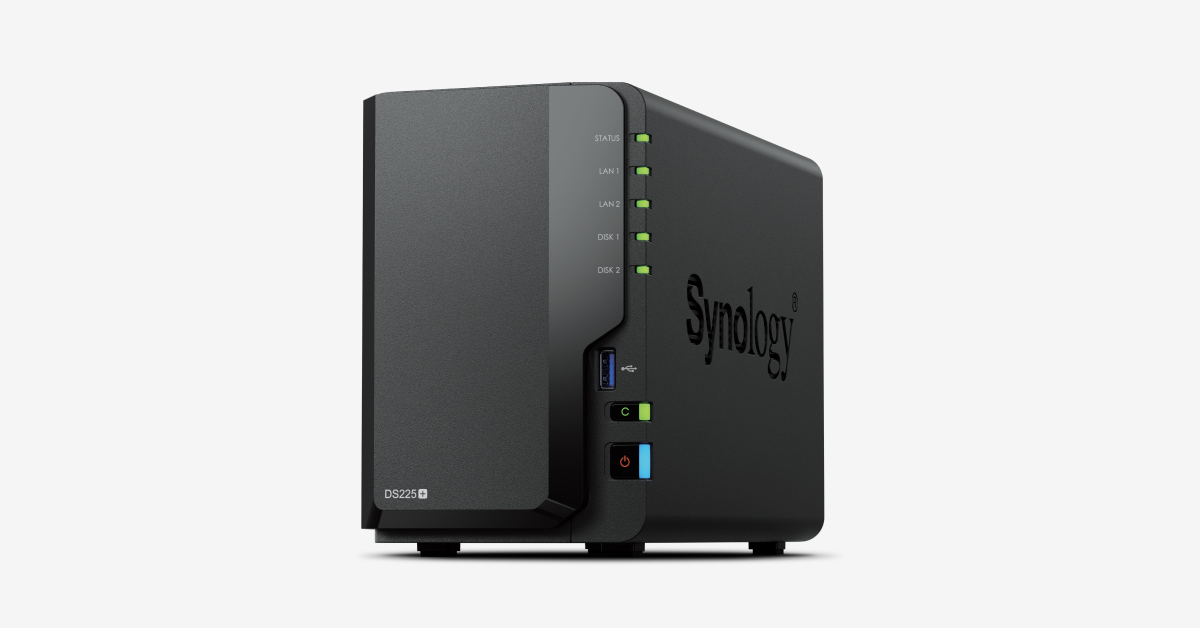
Every photo, document and video you own lives in exactly one of two places: on a box in your house, or on someone else’s computer. A NAS — network attached storage — is the box in your house. Cloud backup is the someone else’s computer. Both protect your files, but they protect them in very different ways, at very different prices, and the right answer for your home depends on how much you store, how much you trust yourself with maintenance, and what happens to your files if your house floods.
In this guide we compare NAS and cloud backup for home use in 2026: the real costs over five years, speed, privacy, reliability and ease of use. Prices and plan details were checked against the providers’ own pages on 19 Nov 2026 and change often. We have not tested these services hands-on; cost figures below are modelled from listed prices, and we say so where they are estimates.
Contents
- The Quick Answer
- What Is a NAS?
- What Is Cloud Backup?
- Cost Compared: 2TB and 10TB Over 5 Years
- Speed and Everyday Use
- Privacy and Security
- Reliability and the 3-2-1 Rule
- Watch: Cloud or NAS?
- Who Should Choose Which?
- Final Verdict
- Frequently Asked Questions
The Quick Answer
- Choose cloud backup if you store under 2TB, want zero maintenance, and want your files safe if something happens to your house. Backblaze Personal Backup at $99 a year for unlimited storage from one computer is the best value for most people.
- Choose a NAS if you store several terabytes, stream media at home, or want your files under your own control. A Synology DS225+ with drives costs roughly $800 to $960 up front and then almost nothing per year.
- Choose both if your files genuinely matter. A NAS is not a backup on its own — it is one copy in one place. The 3-2-1 rule says you need three copies, on two different media, with one off-site. For most homes, that means a NAS plus a cloud backup.
What Is a NAS?

A NAS is a small box with one or more hard drives that plugs into your home network. Every device in the house — phones, laptops, TVs — can reach it, and it can run apps: photo backup, media streaming with Plex, file syncing and even its own cloud backup to another provider. Popular home models include the Synology DS225+ (2-bay, about $599 for the enclosure without drives) and the Synology DS923+ (4-bay, about $520). You buy the drives separately, and drive prices rose sharply in autumn 2026 — a 4TB NAS drive runs roughly $100 to $180, so a two-drive setup adds about $200 to $360 to the enclosure price.
A NAS is fast on your own network — far faster than downloading from the cloud — and it works when your internet goes down. It also has no monthly fee. The catch is that you are the IT department: you install the drives, set up the RAID, apply updates, and replace a drive when it fails. And one thing to know about Synology specifically: since April 2025, its newer Plus models restrict you to drives on Synology’s own compatibility list, which limits your choice of drives. Our guide to the best home NAS for beginners compares the Synology DS225+ with the UGREEN DXP2800 and QNAP TS-264 in detail.
What Is Cloud Backup?
Cloud backup means your files are copied to a provider’s data centres over the internet. There are two kinds, and the difference matters. Sync services — Google One, iCloud+, OneDrive, Dropbox — keep your files mirrored across your devices, which is convenient, but sync is not backup: if you delete a file or ransomware encrypts it, the change syncs everywhere. True backup services — Backblaze Personal Backup, Backblaze B2, iDrive — keep versioned copies designed to be restored after a disaster.
The big names and their listed prices: Backblaze Personal Backup is $99 a year for unlimited storage from one computer. Backblaze B2, its pay-as-you-go storage, is $6.95 per TB per month. Google One charges $9.99 a month for 2TB. iCloud+ charges $9.99 a month for 2TB. Confirm the current price before you commit.
Cost Compared: 2TB and 10TB Over 5 Years
The honest way to compare NAS and cloud is total cost over five years, not the first month. The figures below are modelled from the listed prices above — estimates, not quotes.
| Option | 2TB over 5 years | 10TB over 5 years | Notes |
|---|---|---|---|
| Google One 2TB | About $600 | Not available at 10TB (next step is a 20TB plan at $100/month) | Sync + storage; $9.99/month for 2TB |
| iCloud+ 2TB | About $600 | 6TB plan is $29.99/month; 12TB is $59.99/month | Best for Apple households |
| Backblaze Personal | About $495 | About $495 | Unlimited, one computer, $99/year; no NAS support |
| Backblaze B2 | About $834 | About $4,170 | $6.95/TB/month; free downloads up to 3x stored data |
| Synology DS225+ NAS | About $800–$960 up front, then ~$10/year power | About $1,495 up front (larger drives) | Enclosure about $599 + drives; no monthly fee |
The pattern is clear. At 2TB, cloud is cheaper: $495 to $600 over five years beats $800-plus for a NAS, and you get off-site protection included. At 10TB, the maths flips hard: a NAS at roughly $1,495 pays for itself against Backblaze B2 in about 21 months, and Google One does not even offer a 10TB tier. The break-even point for a NAS sits somewhere around 4 to 6TB for most households — below that, cloud wins; above it, a NAS wins on cost, and wins bigger the more you store.
Last checked: 19 Nov 2026. Modelled from listed prices; confirm current prices before buying.
Speed and Everyday Use
On your home network, a NAS is dramatically faster than the cloud. Copying a folder of photos to a NAS over gigabit Ethernet takes seconds; uploading the same folder to Google Drive can take many minutes, and your upload speed is usually far slower than your download speed. A NAS also works when the internet is down — your files are in the next room, not in a data centre.
Cloud wins on access from anywhere. Your files are available on any device, anywhere with internet, with no setup, no port forwarding and no dynamic DNS. Remote access to a NAS is possible — Synology’s QuickConnect and similar tools make it easy — but it takes configuration, and it is only as fast as your home upload speed. If you mostly use files at home, a NAS feels instant in a way the cloud never will.
Privacy and Security
A NAS keeps your files on hardware you own, in your house, under your control. Nobody mines them for advertising, no provider changes its terms, and no one else’s data breach exposes yours. That is a real advantage — and it is why privacy-conscious households choose a NAS even when the cloud is cheaper.
But control cuts both ways. A NAS is only as secure as you make it: weak passwords, open ports and unpatched software are how home NAS boxes get hit by ransomware, and there were active attacks on Synology devices in 2026. Cloud providers, for all their faults, employ full-time security teams, encrypt your data in transit and at rest, and keep it in facilities with physical security you cannot match at home. The safest answer is not one or the other: encrypt your NAS, keep it updated, use strong passwords and two-factor authentication — and keep an off-site copy anyway.
Reliability and the 3-2-1 Rule
The most important sentence in this guide: RAID is not a backup. RAID protects you if one drive fails — the NAS keeps running and you swap in a new drive. It does not protect you against fire, flood, theft, a power surge, accidental deletion, or ransomware that encrypts everything on the box. A NAS on its own is one copy in one place, and one copy in one place is not a backup strategy.
The standard professionals use is the 3-2-1 rule: three copies of your data, on two different types of media, with one copy off-site. For a home, that usually means your computer, your NAS, and a cloud backup of the NAS (Synology’s Hyper Backup or QNAP’s Hybrid Backup Sync can copy the NAS to Backblaze B2 or another cloud). Backblaze Personal Backup, note, covers one computer and its attached drives; it does not back up a NAS, so NAS owners need B2 or a similar service for the off-site copy.
Watch: Cloud or NAS?
This video compares cloud storage with a NAS in plain language — cost, speed, security, remote access, what happens when the internet goes down, and how RAID actually works.
Who Should Choose Which?
Choose cloud backup alone if you store under 2TB, you have one or two computers, you want to set it up once and forget it, and you travel or work from many places. Backblaze Personal at $99 a year is the value pick; Google One or iCloud+ make more sense if you are already deep in those ecosystems.
Choose a NAS alone if you store several terabytes, you stream media with Plex, you run a home lab, or you want your files under your own control — and you accept that you are the IT department. It is also the right choice if your internet is slow or unreliable.
Choose both if your files would be genuinely hard to replace: a NAS for speed and control at home, plus a cloud copy for the day something happens to the house.
Final Verdict
For most homes, cloud backup is the right starting point: it is cheaper under 2TB, it needs no maintenance, and it protects your files if something happens to your house. But once you pass a few terabytes, a NAS becomes the cheaper and faster option — and for large photo and video collections it is not close. The smart answer for anyone whose files truly matter is both: a NAS at home for speed and control, and a cloud backup for the off-site copy. That combination costs more than either alone, and it is the only one that follows the 3-2-1 rule.
Frequently Asked Questions
Is a NAS a backup? No — not on its own. A NAS is storage, and RAID protects against a single drive failing. A backup needs a second copy somewhere else, ideally off-site. Use your NAS as one copy and back it up to the cloud or an external drive kept elsewhere.
How much does a home NAS cost? A two-bay Synology DS225+ enclosure is about $599, plus roughly $200 to $360 for two 4TB drives at autumn 2026 prices — so roughly $800 to $960 to get started. After that the running cost is a few dollars a year in electricity.
Can Backblaze Personal Backup back up my NAS? No. The $99-a-year Personal plan covers one computer and its directly attached drives only. To back up a NAS to Backblaze you need Backblaze B2, which is billed at $6.95 per TB per month.
Is Google Drive a backup? Not by itself. Google Drive, iCloud and OneDrive are sync services: they mirror files across devices, so a deletion or ransomware attack can propagate everywhere. Pair them with a true versioned backup for anything irreplaceable.
What is the 3-2-1 backup rule? Keep three copies of your data, on two different types of media, with one copy off-site. For example: the original on your computer, a copy on your NAS, and a copy in the cloud. It is the simplest rule that survives drive failure, theft and house fires.