- Home
- Electronics
- Best 3D Printers for Beginners ...


Three years ago, a first 3D printer meant a weekend of assembly, a dozen failed prints, and a crash course in bed levelling. In 2026 the best beginner printers arrive pre-assembled, calibrate themselves, and produce a clean first print in about twenty minutes. The hard part now is choosing: the cheapest good printer costs $199, the easiest costs $259, and the one you will still love in two years costs $349.
Prices below are US store prices for the printer only, before tax. Prices move constantly, especially around sales events, so treat the figures as a snapshot — last checked: 19 Nov 2026.
Contents
- Best beginner 3D printers at a glance
- Bambu Lab A1 mini — best first printer overall
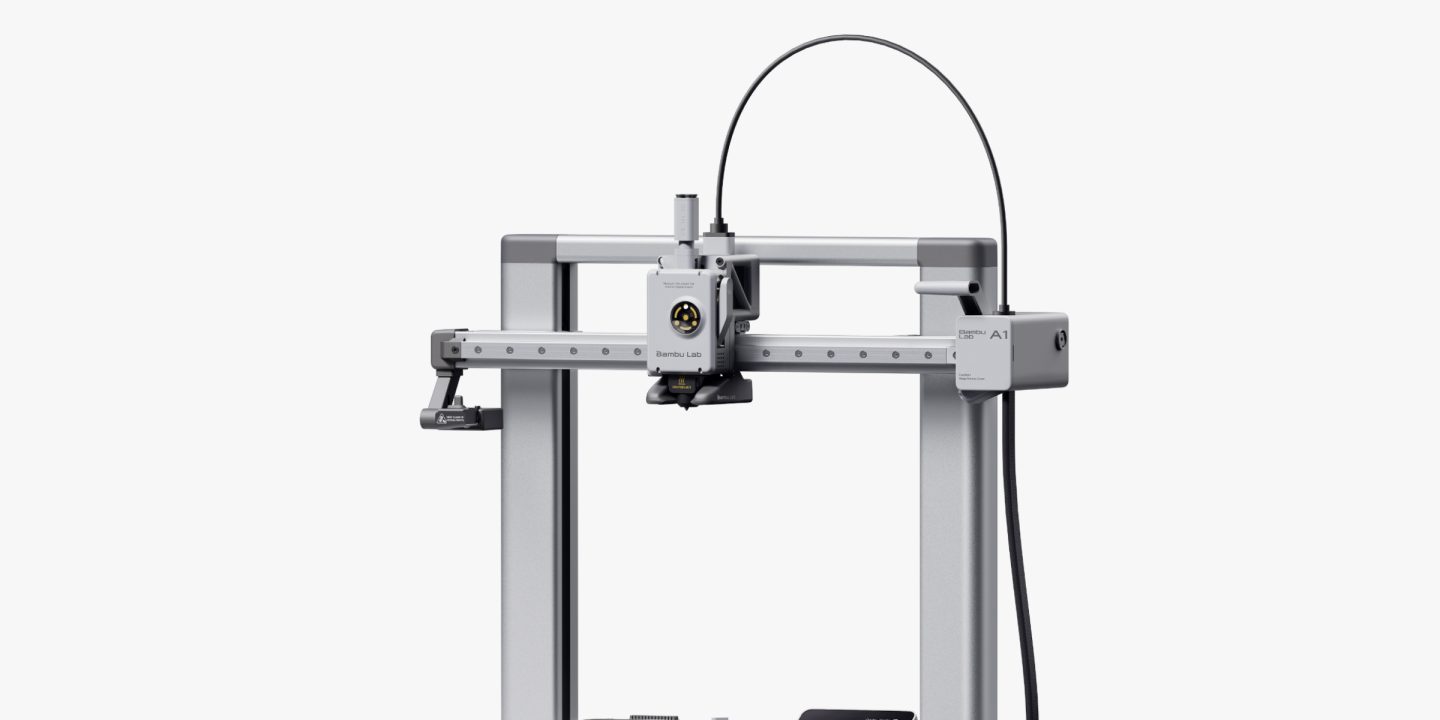
- Bambu Lab A1 — easiest to live with
- Bambu Lab P1S — best printer to grow into
- Creality Ender-3 V3 SE — best budget printer
- Prusa MK4S — best printer for learning
- What to check before you buy
- Watch: which first printer should you buy?
- Final verdict
- Frequently asked questions
Best beginner 3D printers at a glance
| Printer | Build volume | Enclosed | Auto calibration | Price* |
|---|---|---|---|---|
| Bambu Lab A1 mini | 180 × 180 × 180 mm | No | Yes, full-auto | $199 |
| Bambu Lab A1 | 256 × 256 × 256 mm | No | Yes, full-auto | $259 |
| Bambu Lab P1S | 256 × 256 × 256 mm | Yes | Yes, full-auto | $349 |
| Creality Ender-3 V3 SE | 220 × 220 × 250 mm | No | Yes, CR-Touch | $199 |
| Prusa MK4S (kit) | 250 × 210 × 220 mm | No | Yes, loadcell | $709 |
*Prices are US store prices, last checked: 19 Nov 2026. Bambu Lab prices are Black Friday sale prices; the A1 mini’s typical price is $219 and the A1’s is $299.
Bambu Lab A1 mini — best 3D printer for beginners overall
The Bambu Lab A1 mini is the default recommendation for a first 3D printer, and it is not close. It arrives pre-assembled and pre-tuned, sets up in about 20 minutes, and runs a full automatic calibration before every print — bed levelling, nozzle checks and vibration compensation, all without you touching anything. The build volume is a 180 mm cube, the top speed is rated at 500 mm/s, and it prints PLA, PETG, TPU and PVA. On Bambu Lab’s US store it costs $199 on sale, against a $219 typical price.

The 180 mm build volume is the only real limitation: it covers toys, phone stands, desk organisers and small replacement parts, but not helmets, large vases or full-size cosplay pieces. The A1 mini Combo adds the AMS lite multi-colour unit for $299 on sale (typical $329), which prints in up to four colours at once — fun, but not necessary for a first printer, and every colour change adds waste and print time.
What we love: Cheapest way into the Bambu ecosystem, 20-minute setup, full-auto calibration, quiet at under 48 dB in silent mode. Considerations: 180 mm build volume is small, open frame cannot print ABS well, multi-colour costs extra.
Bambu Lab A1 — easiest 3D printer to live with
The Bambu Lab A1 is the same idea as the A1 mini with room to grow: a 256 mm cube build volume, the same full-auto calibration, the same 500 mm/s top speed, and the same 20-minute setup. On Bambu Lab’s US store it costs $259 on sale, against a $299 typical price — $60 more than the A1 mini for a build volume more than twice as large. That is the best $60 in this guide.
For most beginners, the A1 is the right answer to the size question. The extra volume covers storage boxes, larger figurines, functional brackets and household parts that the mini cannot fit, and the bigger bed does not make the printer any harder to use. It is still an open-frame printer, so it is best for PLA and PETG rather than ABS or ASA, which need an enclosed chamber to print well. If you can stretch to $259, buy the A1 over the mini and skip the upgrade you would otherwise make in six months.
What we love: Big 256 mm build volume, same effortless setup as the mini, only $60 more than the A1 mini. Considerations: Open frame limits high-temperature filaments, AMS lite multi-colour is an extra purchase, no enclosure.
Bambu Lab P1S — best beginner 3D printer to grow into
The Bambu Lab P1S is the printer for the beginner who already knows they will get hooked. It is an enclosed CoreXY machine with the same 256 mm build volume as the A1, but the enclosure, faster CoreXY motion and active chamber temperature control mean it prints ABS, ASA and other engineering filaments that open-frame printers struggle with. On Bambu Lab’s US store it costs $349 on sale, which makes it the cheapest enclosed printer from a major brand in 2026.
The enclosure also makes it quieter and safer around children and pets, and it keeps dust and draughts away from prints. The trade-off is price: at $349 it is $90 more than the A1, and the enclosed design makes nozzle and bed access slightly more fiddly. If you are buying for a household with kids, or you already know you want to print functional parts in ABS, the P1S is worth the step up.
What we love: Enclosed for ABS and ASA, CoreXY speed, quieter and safer, $349 is cheap for an enclosed printer. Considerations: $90 more than the A1, slightly harder to access the nozzle and bed, overkill for PLA-only printing.
Creality Ender-3 V3 SE — best budget 3D printer for beginners
The Creality Ender-3 V3 SE is the cheapest widely recommended beginner printer, and the one with the biggest community behind it. It costs $199 on Creality’s official store ($179 on sale in October 2026), and for that you get a direct-drive extruder, CR-Touch auto bed levelling, a 220 × 220 × 250 mm build volume, and print speeds up to 250 mm/s. The Ender-3 name has been around since 2018, which means almost every problem a beginner can hit has already been answered in a forum thread or a YouTube video.
Compared with the Bambu printers above, the V3 SE asks more of you. Assembly takes longer, calibration is less automatic, and print quality out of the box is good rather than excellent. That is a drawback if you want instant results, and a genuine advantage if you want to understand how 3D printing works.
What we love: $199 is the cheapest way in, huge owner community, direct-drive extruder, auto bed levelling included. Considerations: More setup and tuning than Bambu, slower at 250 mm/s, print quality needs more dialling in.
Prusa MK4S — best 3D printer for learning the craft
The Original Prusa MK4S is the most expensive printer in this guide and the best built. It costs $709 as a kit or $999 assembled on Prusa’s store, and for that you get a 250 × 210 × 220 mm build volume, loadcell-based fully automatic bed levelling, a 290°C hotend, and the open-source design and documentation that made Prusa the reference brand for the whole hobby. The kit version takes an evening to build, and Prusa’s instructions are famously good — many owners say building it is the best possible introduction to how a 3D printer works.
The MK4S is not the printer for someone who just wants a toy printed by the weekend. It is slower than the Bambu machines, it is open-frame, and it costs three times the A1 mini. What it offers is reliability, repairability and support: every part is replaceable, the firmware is open, and Prusa’s support team answers in hours rather than days.
What we love: Superb build quality and support, open-source and fully repairable, kit teaches you the machine. Considerations: $709 kit / $999 assembled is serious money, slower than Bambu, open frame, kit takes an evening to build.
What to check before you buy
Start with PLA. Every printer here prints PLA beautifully, and PLA is cheap, easy and safe. Do not buy a printer for ABS or nylon until you have printed a month of PLA — you may never need anything else.
Check the build volume against what you want to print. The A1 mini’s 180 mm cube is the key decision in this guide. Measure the largest thing you expect to print; if it is bigger than 180 mm in any direction, buy the A1 or the Ender-3 V3 SE instead.
Budget for filament and accessories. A spool of PLA costs $20–$25, and you will want two or three to start, plus a scraper, spare nozzles and a deburring tool. Add $60–$80 to the printer price for a sensible first order.
Think about where it will live. 3D printers are not silent — the A1 mini runs under 48 dB in silent mode, which is quiet for a printer, but it is still a machine with fans and motors. A spare room or garage is ideal; a bedroom is not.
Once you are printing, you will want a place to design and store your models — our guide to the best home NAS for beginners covers keeping your files safe, and the best mini PCs make a good slicing workstation next to the printer.
Watch: which first printer should you buy?
This beginner-friendly video compares the Bambu Lab A1 mini, A1, P1S and P2S side by side, with the prices recorded in October 2026, and explains which one fits different budgets and projects.
Final verdict
The best 3D printer for beginners in 2026 is the Bambu Lab A1 mini at $199 — it is the cheapest, easiest way to find out whether you love 3D printing, and most people will never need more. If you can spend $60 more, the Bambu Lab A1 at $259 is the smarter buy, because its 256 mm build volume covers the projects the mini cannot. The P1S at $349 is the right choice if you want an enclosed printer for stronger filaments, the Creality Ender-3 V3 SE at $199 is the best budget pick for tinkerers who want to learn the machine, and the Prusa MK4S is the long-term investment for anyone who wants the best-built printer in the hobby. Start with PLA, print something useful in your first week, and let the printer earn its keep before you buy upgrades.
Frequently asked questions
What is the best 3D printer for a complete beginner? The Bambu Lab A1 mini. It arrives pre-assembled, sets up in about 20 minutes, calibrates itself before every print, and costs $199 on sale. It is the easiest first printer you can buy.
Is the A1 mini too small? For most beginners, no. Its 180 mm cube covers toys, phone stands, organisers and small parts. If you want to print larger objects, the Bambu Lab A1 has the same ease of use with a 256 mm build volume for $60 more.
Do I need an enclosed printer? Only if you plan to print ABS, ASA or nylon, which need a warm, draught-free chamber. For PLA and PETG — the filaments beginners should start with — an open-frame printer like the A1 is fine.
How much does 3D printing cost to run? A spool of PLA costs $20–$25 and prints dozens of small objects. Electricity is a few cents per print. The printer itself is the biggest expense, as Prusa themselves point out — running costs are low.
Can a 3D printer print in multiple colours? Yes, with an add-on. Bambu Lab’s AMS lite prints in up to four colours on the A1 and A1 mini, and the A1 mini Combo includes it for $299 on sale. Colour changes add waste and print time, so start with single-colour printing.
Prices and specifications: last checked: 19 Nov 2026. Check the manufacturer’s own store for the current price before ordering. See also: Bambu Lab A1 mini.